Open .svg files online
To open an .svg file in your browser, press Open editor on the vector editor, then use Open inside the editor and pick your file. On 2026-10-13 we opened a 400 x 300 test SVG (shapes, a curve and text) on anyedit.app and it rendered correctly. We moved a circle, saved the file back out as .svg, and it opened in the browser with the shapes and colors intact. One flaw: the exported text came out smaller, so check any text after saving. Nothing is uploaded and there is no sign-up.
Best on a desktop browser. This editor has desktop menus and shortcuts.
Can I open it?
tested 2026-10-13 · engine 0.9.0 · chromium 152 desktop · anyedit.app
| Check | Result | Notes |
|---|---|---|
| Listed by the engine | Listed in docs | SVG is a first-class format with import and export, alongside PDF and PDF-compatible .ai. SVGZ opens too. |
| Opened a .svg file | Works | A hand-made 400 x 300 SVG with a background, a circle, a rounded square, a curve and text opened and drew correctly. The text layer showed a pink highlight box; we did not confirm what it means. |
| Edited it | Works | We selected the circle and changed its Y position from 150 to 100 px. The circle moved and the file tab showed it as changed. |
| Saved as .svg | Partial | Save As with the SVG format gave a valid .svg file. The moved circle and all colors were kept, but the text size was lost (the style value has no unit), so it shows smaller in a browser. The editor also noted that SVG does not keep everything a native document holds. |
| Phone screen (390 px wide) | Not tested yet | Not tested for this format. |
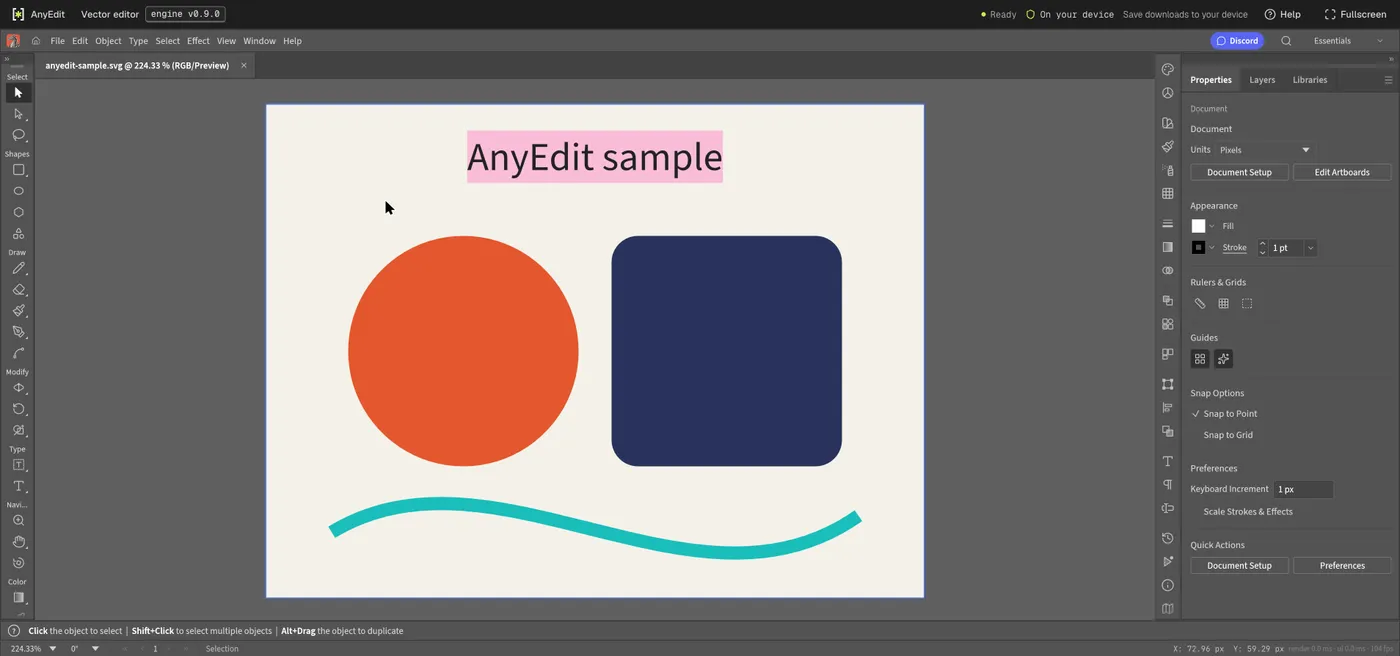
Our test file open in the vector editor on anyedit.app, 2026-10-13
FAQ
Do I need Illustrator to open an SVG file?
No. The vector editor opens .svg files in your browser. We opened and edited a test SVG there on 2026-10-13.
How do I open an SVG file in the browser?
Press Open editor on the vector editor, choose Open inside the editor and pick your .svg file. Dropping a file onto the page frame does not hand it to the editor.
Can I save my changes back to .svg?
Yes, with Save As and the SVG format. In our test the file was valid and the edit was kept, but text size was lost, so compare the result with your original.
Is my SVG file uploaded?
No. It is read by code running in your browser.