Open .csv files online
To open a .csv file in your browser, press Open editor on the spreadsheet editor, choose File > Open > Browse and pick your file. On 2026-11-03 we opened a 4-row test file in GridCraft 0.13.0 on anyedit.app. Commas and quotes inside fields, a line break inside a field, accents (José Ñandú) and Japanese text (東京 テスト) all loaded correctly. Values that look like numbers or dates were converted: 007 became 7, 0042 became 42, 1E5 became 100000, 1/2 became 2 January 2026 (the current year was added) and 3-4 became 4 March. Numbers of 16 or more digits turned into floating-point numbers, so 9007199254740993 became 9007199254740992. Save As CSV UTF-8 wrote the converted values as displayed (7, 42, 1.00E+05, 2-Jan), not the original text, so the changes are in the saved CSV as well. That file used commas and Windows line endings (CRLF), with no byte-order mark. Data > Get Data (Text/CSV) opened the file the same way, with no import wizard to set a column to text. If your CSV holds IDs with leading zeros, long numbers or date-like codes, check the result before you save over anything. Large files, semicolon-separated files and other encodings are Not tested yet.
Best on a desktop browser. This editor has desktop menus and shortcuts.
Can I open it?
| Check | Result | Notes |
|---|---|---|
| Listed by the engine | Listed in docs | CSV and TSV read and write. In our 2026-10-17 TSV test, Save As could write CSV UTF-8 but not TSV. |
| Opened a .csv | Partial | File > Open > Browse with anyedit-sample-quoted.csv (UTF-8, no byte-order mark, 4 rows, 7 columns). Quoted commas, doubled quotes, a line break inside a field, José Ñandú and 東京 テスト were right. Types were converted, as the next rows show. |
| Leading zeros and numbers written as text | Not supported | In the code column 007 became 7, 0042 became 42, 1E5 became 100000 (shown as ######, saved as 1.00E+05) and 00 became 0. |
| Long numbers | Not supported | 1234567890123456789 showed as 1.2E+18 and is stored as a floating-point number; 9007199254740993 became 9007199254740992. |
| Date-like text | Not supported | 1/2 became 2026-01-02 (shown 2-Jan), 3-4 became 2026-03-04 (shown 4-Mar) and Mar-05 became 2005-03-01 (shown Mar-05). 2026-11-03 stayed a date. |
| Edited a cell | Works | Amount 12.5 changed to 99.5. |
| Saved with Save As > CSV UTF-8 | Partial | Downloaded anyedit-sample-quoted.csv (303 bytes): commas, CRLF, no byte-order mark, quoting correct, accents and Japanese kept, our edit present. Values were written as displayed: 7, 42, 1.00E+05, 0, 1234567890123456800, 2-Jan, 4-Mar and Mar-05. |
| Saved as .xlsx (Ctrl+S) | Works | Downloaded anyedit-sample-quoted.xlsx. openpyxl read the converted values as numbers and dates (7, 42, 100000, 0, and date cells), not the original text. |
| Large files, semicolon separators, byte-order mark, other encodings | Not tested yet | Not tested yet. Tab-separated files are on the .tsv page. |
| Phone screen (390 px wide) | Not tested yet | Not tested for this format. |
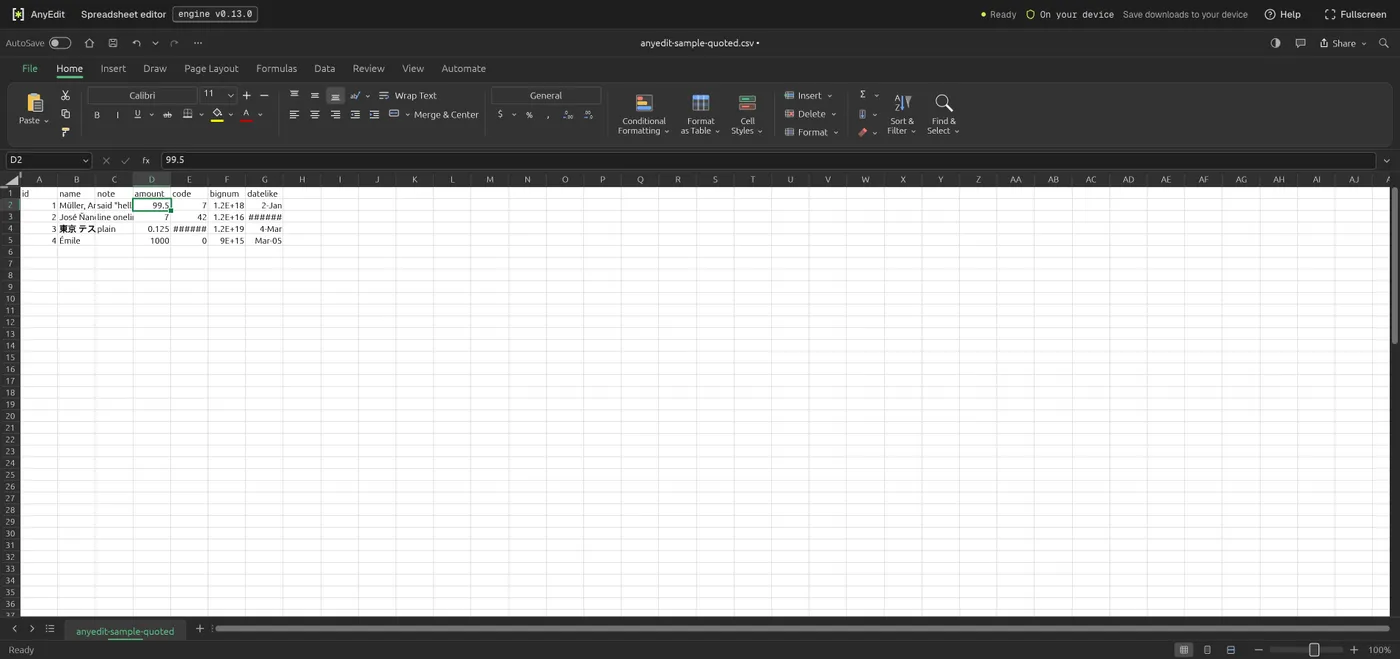
Our test file open in the spreadsheet editor on anyedit.app, 2026-11-03