Open .wav files online
To open a .wav file in your browser, press Open editor on the audio editor, then choose File > Import > Audio and pick your file. On 2026-11-03 we imported a 2-second 44.1 kHz stereo WAV (a 440 Hz tone on the left channel, 880 Hz on the right) into SoundCraft 0.14.0 on anyedit.app. It appeared as a new track and clip beside the demo session's nine tracks. We applied AudioSuite > Other > Gain at -12 dB, soloed the track and used File > Bounce Mix as WAV at 16-bit. The file we measured was 2.000 seconds of 48 kHz stereo 16-bit PCM, exactly 12.0 dB quieter than the source on both channels, with 440 Hz still on the left and 880 Hz on the right and nothing from the demo tracks mixed in. The sample rate changed from 44.1 to 48 kHz because a bounce uses the session rate. Bounce Mix mixes every unmuted track, so solo the one you want. Playback by ear, cutting, fades, other effects, mono and 24-bit sources, WAV tags and long files are Not tested yet. Earlier MP3 and Ogg tests also bounced to WAV at 48 kHz. Nothing is uploaded.
Best on a desktop browser. This editor has desktop menus and shortcuts.
Can I open it?
| Check | Result | Notes |
|---|---|---|
| Listed by the engine | Listed in docs | WAV, BWF and RF64 in and out. Bounce Mix in our tests offered WAV, AIFF and FLAC only. |
| Imported a .wav | Works | File > Import > Audio with anyedit-sample-tones.wav (made with ffmpeg: 2.0 s, 44.1 kHz, 16-bit stereo, 353 KB). The status bar said Imported anyedit-sample-tones.wav, and a new track and a clip named anyedit-sample-tones (2ch) appeared. |
| Edited with Gain | Works | With the clip selected, AudioSuite > Other > Gain at -12, then Render. A new clip named anyedit-sample-tones-gain (2ch) appeared. |
| Bounced as WAV | Works | We soloed the track and chose File > Bounce Mix with WAV at 16-bit (the list offers 16-bit, 24-bit and 32f-bit; 24-bit is the default). It downloaded Midnight Groove Bounce.wav, 384 KB. ffprobe read pcm_s16le, 48000 Hz, 2 channels, 2.000 s. |
| Level and channels of the bounce | Works | Per-channel level fell from -27.09 to -39.09 dBFS, which is -12.0 dB. The spectrum peaks stayed at 440 Hz on the left and 880 Hz on the right, and essentially all the energy sat within 20 Hz of those tones, so none of the demo tracks leaked in. |
| Sample rate | Partial | The source was 44.1 kHz and the bounce 48 kHz, which is the session rate. |
| WAV bounced from MP3 and Ogg (2026-10-18 and 2026-10-19) | Works | An MP3 edit bounced to WAV at 48 kHz and 24-bit with no ID3 tags, and an Ogg Vorbis file bounced to WAV at 48 kHz. See the .mp3 and .ogg pages. |
| Playback by ear, cutting, fades, other effects | Not tested yet | Not tested yet. We measured the exported file and did not listen to it. |
| Mono, 24-bit or float sources, BWF, RF64, WAV tags, long files | Not tested yet | Not tested yet. |
| Phone screen (390 px wide) | Not tested yet | Not tested for this format. |
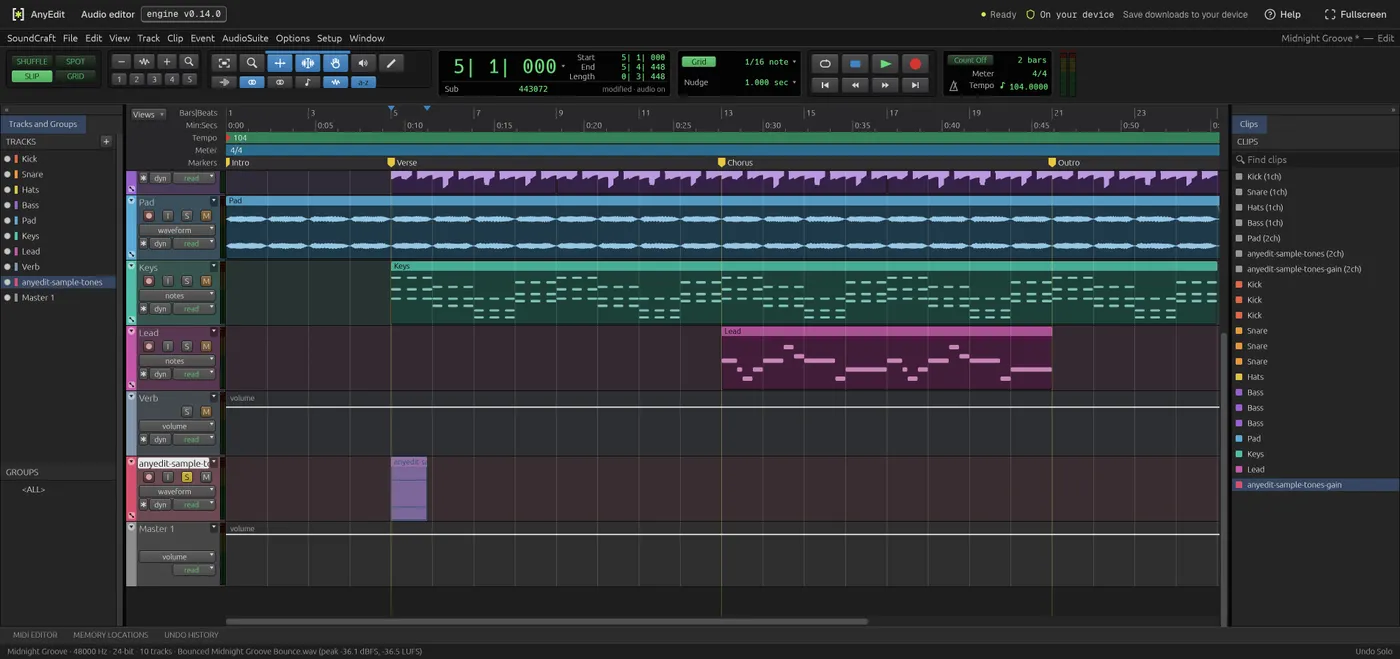
Our test file open in the audio editor on anyedit.app, 2026-11-03