Open .aiff files online
To open an .aiff file in your browser, press Open editor on the audio editor, then choose File > Import > Audio and pick your file. The audio is decoded and added as a new track with its waveform, and you can edit it there. AIFF normally holds uncompressed audio, like WAV, so it is lossless. On 2026-10-22 we imported three files we made ourselves: a 5-second 16-bit stereo AIFF, a 24-bit mono AIFF, and an AIFF-C file (type sowt, little-endian). All three opened with the right channel count. We lowered the stereo file by 12 dB with the AudioSuite menu and saved it with File > Bounce Mix as AIFF, 16-bit. The file was a valid AIFF of exactly 5.000 seconds, 12.0 dB quieter in both channels, with 440 Hz still only on the left and 880 Hz only on the right. Things to know: the downloaded file ends in .aif, the export is at the session rate of 48 kHz and always plain AIFF (never AIFF-C), and a mono file becomes stereo with each channel 3 dB lower. We did not listen to playback. Nothing is uploaded and there is no sign-up.
Best on a desktop browser. This editor has desktop menus and shortcuts.
Can I open it?
| Check | Result | Notes |
|---|---|---|
| Listed by the engine | Listed in docs | AIFF and AIFF-C are listed for both import and export, together with WAV, BWF, RF64 and FLAC, but in our test the Bounce Mix menu offered only WAV, AIFF and FLAC (no AIFF-C). |
| Opened an .aiff file | Works | A 5-second, 44.1 kHz, 16-bit stereo AIFF made with ffmpeg (440 Hz left, 880 Hz right) was added with File > Import > Audio. A new track appeared with a clip marked 2 channels. The system file chooser worked, so no drag and drop was needed. |
| Opened a 24-bit .aiff | Works | A 24-bit, 48 kHz mono AIFF of 3.648 seconds (made from a CC0 recording from Wikimedia Commons) imported as a clip marked 1 channel with its waveform. All three AIFF files are our own, made with ffmpeg. |
| Opened an AIFF-C (.aifc) file | Works | A 16-bit stereo AIFF-C file with the sowt (little-endian PCM) compression type imported as a 2-channel clip, and it decoded correctly: after bouncing it, 440 Hz was only on the left and 880 Hz only on the right. Other AIFF-C types such as compressed ima4 or alaw were not tested. |
| Edited it | Works | We selected the stereo clip and used AudioSuite > Other > Gain with -12 dB, then Render. The clip was replaced by a rendered one named anyedit-sample-gain. |
| Exported as .aiff | Works | We soloed the track and used File > Bounce Mix with the format set to AIFF and a bit depth of 16-bit (16-bit, 24-bit and 32-bit float are offered). The browser downloaded Midnight Groove Bounce.aif, 960,054 bytes. The extension is .aif, not .aiff. |
| Checked the exported .aiff | Works | macOS file reads IFF data, AIFF audio. afinfo and ffprobe read 2 channels, 48,000 Hz, 16-bit big-endian PCM, exactly 5.000 seconds. Both channels measured -33.07 dBFS RMS against -21.07 in the source, exactly 12.0 dB lower. A frequency check found only 440 Hz on the left and only 880 Hz on the right, and nothing at 550 Hz. |
| What the export contains | Partial | The sample rate is the session rate of 48 kHz, not the 44.1 kHz of the source, so it is not a straight copy. A mono clip comes out as stereo with each channel 3 dB lower (a 24-bit mono test file came out 24-bit, 3.648 seconds, -3.000 dB, with a leftover of about -111 dB). The export is plain AIFF; there is no AIFF-C option. A bounce mixes every unmuted track, so we soloed the one we wanted. AIFF text tags were not tested. |
| Other AIFF kinds, and playback | Not tested yet | Not tested yet: 8-bit, 32-bit float and 32-bit integer AIFF, more than two channels, very long files, AIFF-C with compression, and files with markers or tags. We did not play the tracks, so we cannot say how they sound. |
| Phone screen (390 px wide) | Not tested yet | Not tested for this format. |
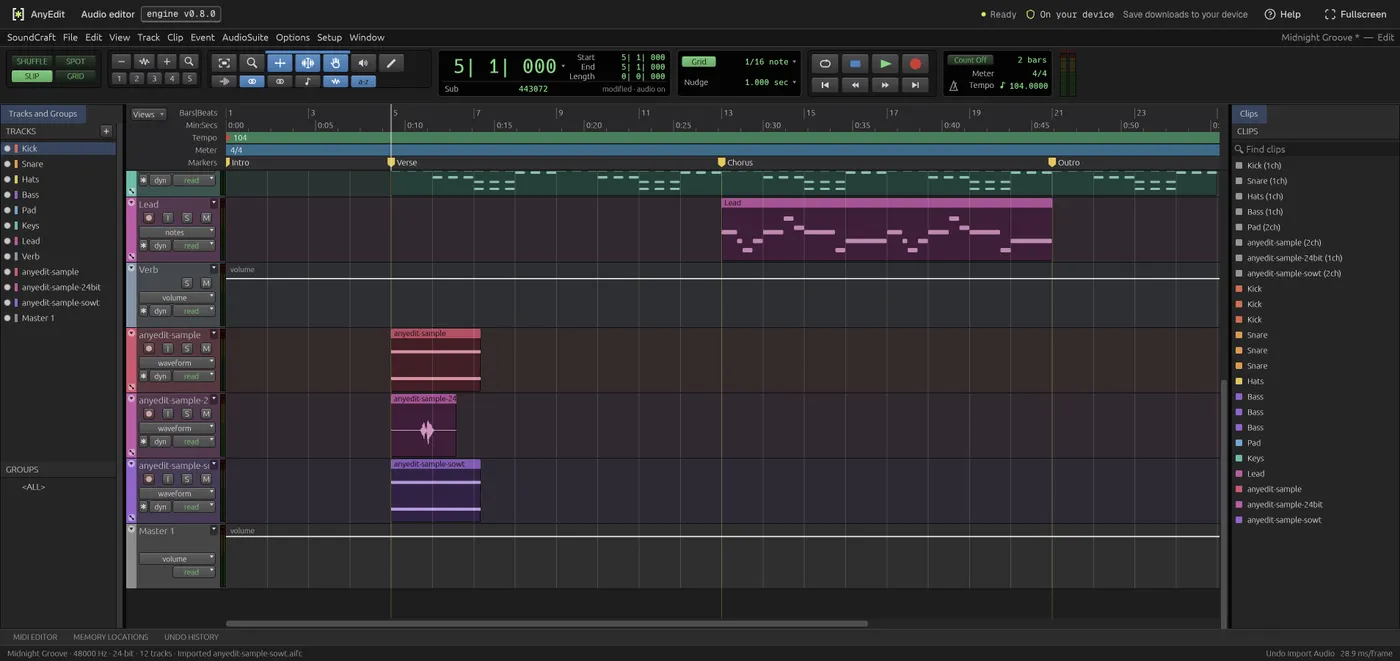
Our test file open in the audio editor on anyedit.app, 2026-10-22