Open .psd files online
To open a .psd file in your browser, press Open editor on the photo editor, choose File > Open and pick your file. On 2026-11-03 we opened five layered test files in PhotoCraft 0.17.0 on anyedit.app, and the Layers panel matched each file: two layers with Cyrillic names, a group holding a shape, a hidden layer, a type layer and a smart object layer. In the two-layer file we painted one black stroke on the top layer and chose File > Save As, which downloads the PSD at once. Read back with the psd-tools library, the saved file had both layers with the same names and order, the untouched layer was pixel-identical, and only the painted layer had changed. Quick Export as PNG matched the composite of that saved PSD exactly. We also saved the other four files without editing them: the group, the hidden flag, the type layer (still text) and the smart object all came back as they were. One change: shape layers were written back as solid-colour fill layers, each shape one pixel smaller on every side. The test files are small (101 pixels wide at most) and come from the psd-tools test set, so layer effects, masks, blend modes, 16-bit colour, PSB and large files are Not tested yet. Earlier runs on 2026-10-24 (engine 0.10.0) and 2026-10-31 (0.17.0) opened single-layer PSD files and exported PNG. Nothing is uploaded; the file is read in your browser.
Best on a desktop browser. This editor has desktop menus and shortcuts.
Can I open it?
| Check | Result | Notes |
|---|---|---|
| Listed by the engine | Listed in docs | PSD and PSB are read and written, including layers. |
| Opened layered PSD files | Works | Five files from the psd-tools test set (MIT licence). The Layers panel listed what psd-tools reads: Фон and Слой (Cyrillic names kept); Group 1 with Shape 1 inside, above Background; Background, Shape 1 and a hidden Shape 2 (eye off); one type layer named A; one smart object layer. Layer sizes in the Properties panel are trimmed to the drawn pixels, so they differ by a few pixels from the file. |
| Type layer and smart object on open | Partial | Properties showed Type Layer and Smart Object Layer. The type file raised a notice: font Arial is not installed, and text may render with a fallback face. |
| Edited one layer | Works | We painted a black stroke on the top layer of the two-layer file. It appeared on that layer only; the layer below did not change. |
| Saved with File > Save As | Works | Downloaded psdtools-2layers.psd (14,179 bytes) with no save dialog. psd-tools read two layers with the same names and order. The lower layer was identical pixel for pixel; the painted layer grew to 86 x 43 pixels and held 1,499 dark opaque pixels. The saved file opened again in the editor with both layers and the stroke. |
| Group, hidden layer, type layer and smart object after saving | Partial | Saved without edits and read back: the group and its child, the hidden flag on Shape 2, the type layer (still type, text A) and the smart object were kept, and all four composites matched the originals exactly. Shape layers came back as solid-colour fill layers, each shape one pixel smaller on every side. |
| Exported PNG | Works | File > Export > Quick Export as PNG downloaded psdtools-2layers.png, 101 x 55 RGB. It matched the composite of the saved PSD with zero difference. |
| Single-layer PSD files (2026-10-24 and 2026-10-31) | Works | anyedit-sample.psd (800 x 500, one Background layer, engine 0.10.0) opened and a PNG downloaded. sample.psd (64 x 48, engine 0.17.0) opened and Quick Export wrote sample.png. |
| Layer effects, masks, blend modes, 16-bit, PSB, large files | Not tested yet | Not tested yet. Our files were tiny and simple, and we did not open a saved file in Photoshop. |
| Phone screen (390 px wide) | Not tested yet | Not tested for this format. |
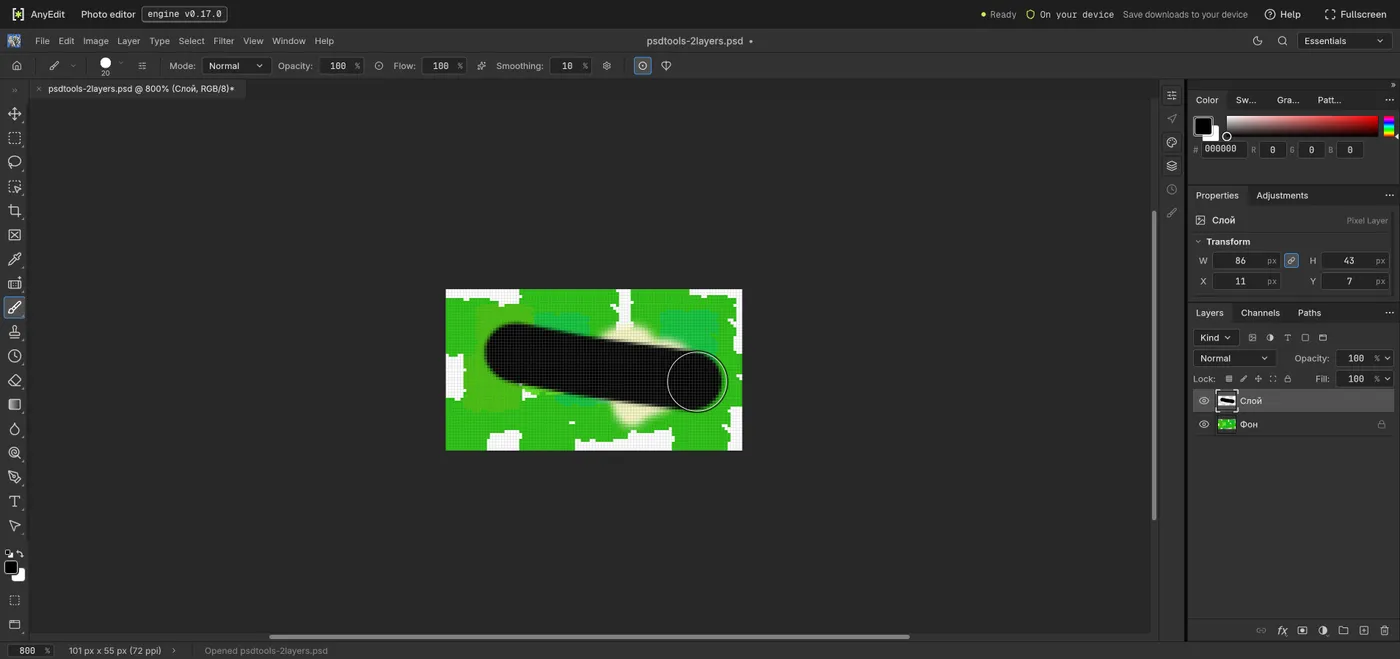
Our test file open in the photo editor on anyedit.app, 2026-11-03