Open .tiff files online
To open a .tiff file in your browser, press Open editor on the photo editor, then choose File > Open and pick your file. On 2026-10-14 we opened an 800 x 500 flat .tiff on anyedit.app and it showed with the right size and colors; an LZW-compressed copy opened the same way. We drew a brush stroke on it and used File > Export As with the TIFF format. The exported .tif was a valid 800 x 500 RGB file that contained the stroke, with sampled colors unchanged. Things to know: Export As is the way to get a TIFF (Save As wrote a .psd in our test), and the export used Deflate compression and byte order different from our original file. We tested only a single-page, 8-bit RGB TIFF. Layered, multi-page, 16-bit and CMYK TIFF files are untested. Nothing is uploaded and there is no sign-up.
Best on a desktop browser. This editor has desktop menus and shortcuts.
Can I open it?
| Check | Result | Notes |
|---|---|---|
| Listed by the engine | Listed in docs | TIFF is listed as a flat format, and layered TIFF (Photoshop layer data inside the TIFF) is listed as read and written in either byte order. PNG, JPEG, WebP and PSD are also supported. |
| Opened a .tiff file | Works | An 800 x 500 flat RGB .tiff (uncompressed, 8 bits per channel, made with the macOS sips tool) opened as a single Background layer. The document showed 800 px x 500 px and the three color bars and white square looked right. |
| Opened an LZW-compressed .tiff | Works | An LZW copy of the same image opened with the same picture and size. We checked it by exporting it as PNG: sampled pixels matched the original colors exactly. |
| Edited it | Works | We painted a black brush stroke across the orange bar with the Brush tool. The stroke showed on the canvas and the tab was marked as edited. |
| Exported as TIFF | Works | File > Export As > Format TIFF downloaded anyedit-sample.tif (8.6 KB). Python (Pillow) and the macOS sips tool both read it as 800 x 500 RGB. The stroke pixels were black, and the orange, navy, white and teal samples were exactly the original colors. It uses Deflate compression, while our original was uncompressed. |
| Saved with Save As | Partial | Save As wrote a .psd file (the status bar said Saved anyedit-sample.psd), not a TIFF. Use Export As to get a TIFF. |
| Opened a layered TIFF | Not tested yet | Not tested. The editor lists layered TIFF support, but we had no layered sample. |
| Multi-page, 16-bit or CMYK TIFF | Not tested yet | Not tested for this format. |
| Phone screen (390 px wide) | Not tested yet | Not tested for this format. |
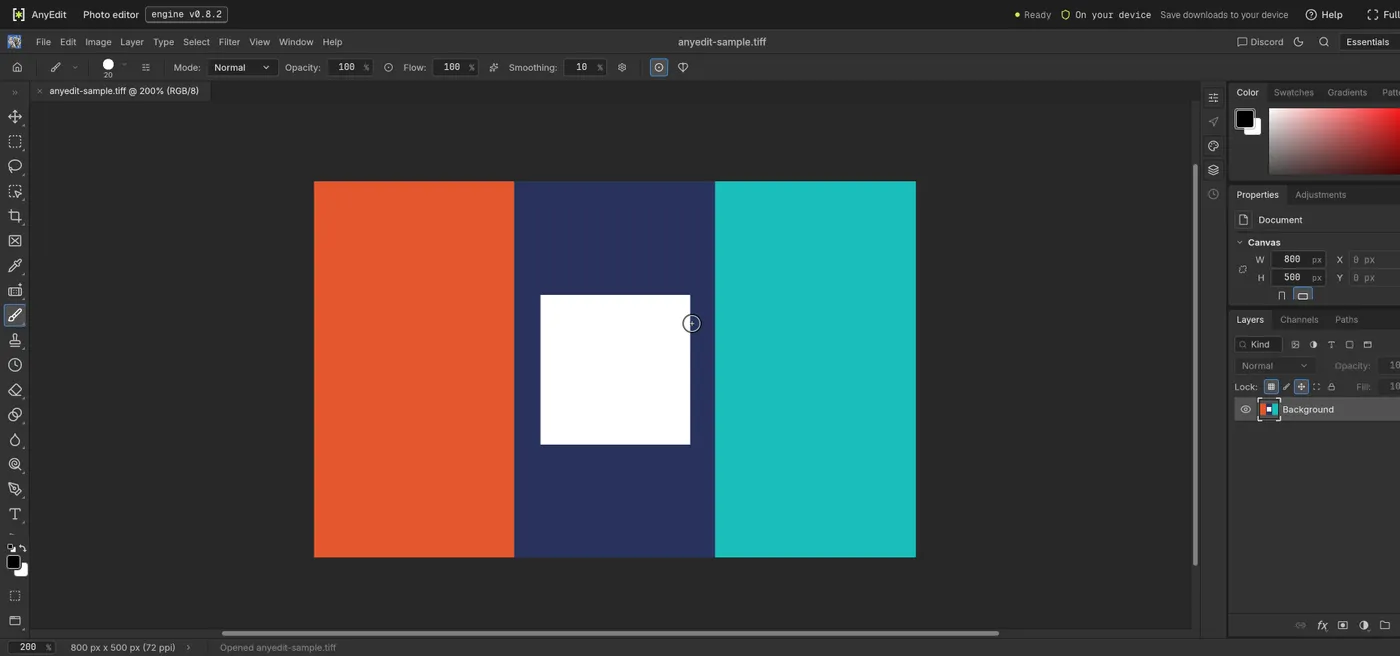
Our test file open in the photo editor on anyedit.app, 2026-10-14