Open .xlsx files online
To open an .xlsx workbook in your browser, press Open editor on the spreadsheet editor, choose File > Open > Browse and pick your file. On 2026-11-03 we opened a two-sheet workbook in GridCraft 0.13.0 on anyedit.app. The formulas (one reads from the other sheet) were calculated, and the header colours, dollar formats, double border, merged cells, a date and the text Café crème and 東京 all showed. We changed one quantity and the totals recalculated. Ctrl+S then downloaded an .xlsx, and the openpyxl library read it back with the formulas still in place, a stored result for each formula, and the styles, merged cells and number formats unchanged. Our workbook was made with openpyxl, not Excel, and its formulas had no stored results, so the numbers on screen came from the editor itself. Charts, PivotTables, conditional formatting, macros, Excel-made files and large workbooks are Not tested yet. By contrast, .ods and .xlsb files open as saved values without live formulas; see those pages. Nothing is uploaded; the file is read in your browser.
Best on a desktop browser. This editor has desktop menus and shortcuts.
Can I open it?
| Check | Result | Notes |
|---|---|---|
| Listed by the engine | Listed in docs | XLSX is the native format: styles, formulas, tables, charts and pictures. |
| Opened a two-sheet .xlsx | Works | File > Open > Browse with anyedit-sample-multi.xlsx (made with openpyxl, 5.9 KB). Tabs Sales and Notes. The file stored no formula results, yet the grid showed $13.50, $22.50, $14.00, $6.00, a sum of $56.00 and 156 for the cross-sheet formula. |
| Styles, merged cells and formats | Works | White bold header on a blue fill, $#,##0.00 formats, a double bottom border on the sum, merged cells F1:G1, a yyyy-mm-dd date, Café crème and 東京 all displayed. |
| Edited a cell | Works | Qty 3 changed to 4: the row total became $18.00, the sum $60.50 and the cross-sheet cell 160.5. The formula bar still showed =D7+Notes!B1. |
| Saved as .xlsx (Ctrl+S) | Works | Downloaded anyedit-sample-multi.xlsx, 5.7 KB, which the file command reads as Microsoft Excel 2007+ (written by GridCraft). openpyxl read both sheets with the formula text kept (=B2*C2, =SUM(D2:D5), =D7+Notes!B1), results stored (18, 22.5, 14, 6, 60.5, 160.5), and the header fill, bold, number formats, double border, merge and column widths unchanged. |
| Charts, PivotTables, conditional formats, tables, macros | Not tested yet | Not tested yet. Our workbook had none. The engine lists charts and tables. |
| Excel-made and large workbooks | Not tested yet | Not tested yet. We opened one generated file. |
| Phone screen (390 px wide) | Not tested yet | Not tested for this format. |
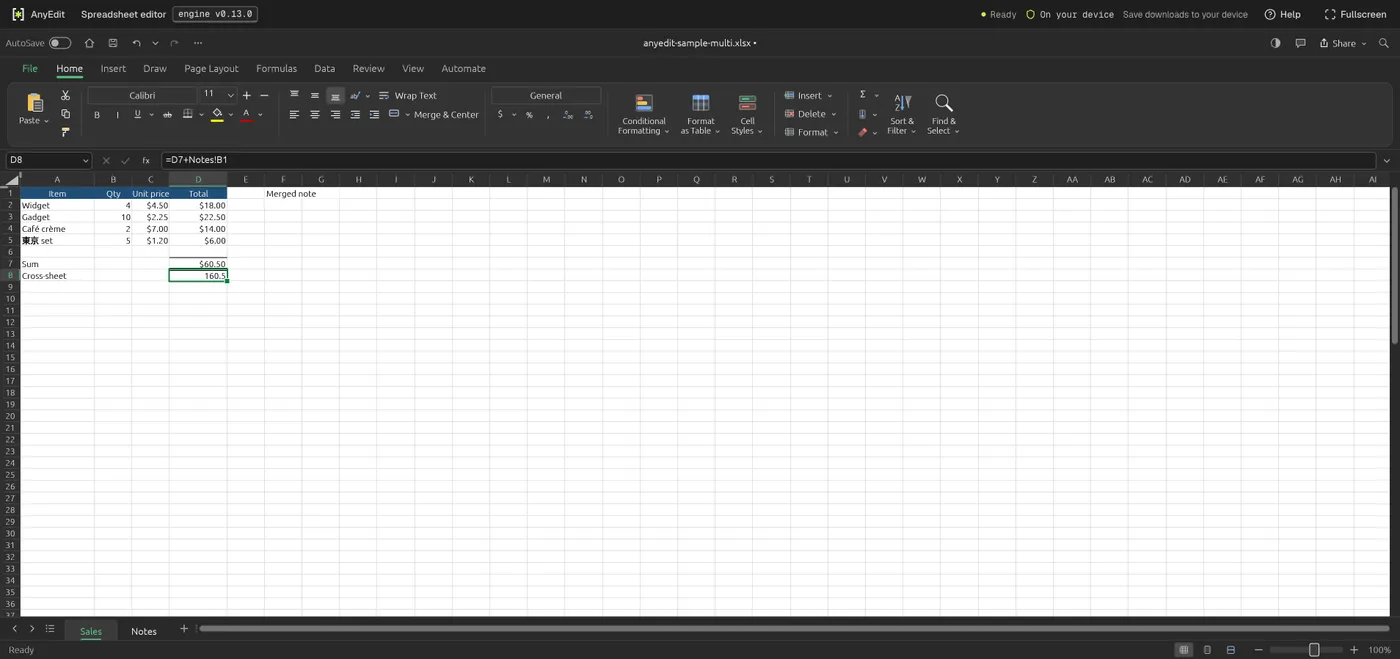
Our test file open in the spreadsheet editor on anyedit.app, 2026-11-03