Open .xlsb files online
To open an .xlsb file in your browser, press Open editor on the spreadsheet editor, choose File > Open > Browse and pick your file. The editor reads the saved values and shows a notice: this is a data-only import, so formulas become their saved results and will not recalculate; formatting, charts, images and macros are not imported; dates, currency and percentages may display as numbers; XLSB saving is not supported, so you save a new .xlsx. On 2026-10-25 we opened two test workbooks from the Apache POI project. A one-sheet workbook with text, numbers, dates, percentages and formulas opened with all its values, and a 3-sheet workbook opened with all three sheet tabs. We typed over a number and used Save As > Download (.xlsx); the downloaded file is a valid workbook with the edit in it, but dates came out as plain serial numbers (42803), formulas are plain values, and the comment, chart and macro project were not in it. A third test file, saved by the Excel 2007 beta, failed with "invalid worksheet ID". Nothing is uploaded and there is no sign-up.
Best on a desktop browser. This editor has desktop menus and shortcuts.
Can I open it?
| Check | Result | Notes |
|---|---|---|
| Listed by the engine | Listed in docs | XLSB worksheet data can be imported, using saved values instead of formulas. XLSB is not listed as a save format. |
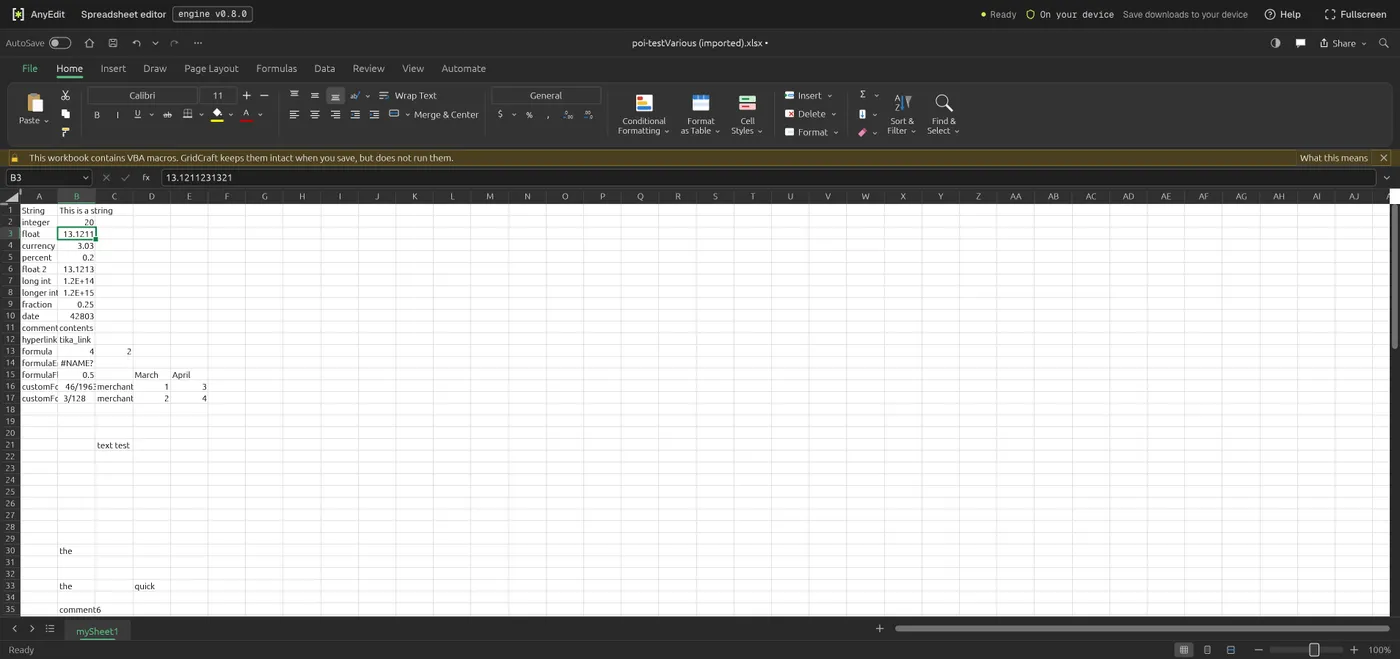
| Opened an .xlsb file with mixed data | Works | File > Open > Browse with testVarious.xlsb (Apache POI test file, 22.7 KB, one sheet named mySheet1; text, integer, float, currency, percent, date, formula, hyperlink and comment cells, plus a chart and a VBA project). The file opened under the name poi-testVarious (imported).xlsx with every cell value in place. A dialog explained the data-only import and added that unsupported XLSB future-record and alternate-content blocks were skipped. A banner said the workbook contains VBA macros and GridCraft does not run them. |
| Opened a 3-sheet .xlsb | Works | sample.xlsb (Apache POI test file, 10.8 KB) opened with its three sheet tabs, Sheet1, rich test and Sheet3. Sheet1 showed the same values as the Python pyxlsb library reads from the file: eight Latin words with 111 to 888, then Nunc 999 and at 4995. We did not open the other two sheets. |
| How values are shown | Partial | Formula cells show their saved results as plain values (for example formula 4). The date cell showed 42803, the percent cell 0.2 and the currency cell 3.03, so number formats are not kept. A formula-error cell showed #NAME? as in the source. The notice says the same: dates, currency and percentages may display as numbers. |
| Edited it | Works | We typed 20 over the integer cell B2 (was 13). The cell changed and the title bar marked the workbook as edited. |
| Saved as .xlsx | Works | File > Save As > Download (.xlsx) downloaded poi-testVarious (imported).xlsx (4.6 KB). The file command reads it as Microsoft OOXML and Python openpyxl opens it: one sheet, mySheet1, with B2 equal to 20 and the other values unchanged. Formula cells are plain values, the date is the number 42803 with General format and the #NAME? cell is text. The package holds no comments, drawing or VBA project parts. |
| Saved back as .xlsb | Not supported | Not possible. The notice says XLSB saving is not supported, and the Download button on Save As says (.xlsx). |
| A file saved by the Excel 2007 beta | Not supported | Simple.xlsb (Apache POI test file, 9.2 KB, written by Excel 2007 Beta 2) was refused with "We can't import 'poi-Simple.xlsb': the file is not a valid spreadsheet: XLSB: invalid worksheet ID". The Python pyxlsb library also failed to read this file, so it is an unusual beta-era file, not a typical workbook. |
| Large workbooks, password-protected files and a file saved by a current Excel | Not tested yet | Not tested. Our three files are small test files from a software project; none was saved by a current version of Excel. |
| Phone screen (390 px wide) | Not tested yet | Not tested for this format. |
Our test file open in the spreadsheet editor on anyedit.app, 2026-10-25