Open .cr2 files online
To open a Canon .cr2 RAW photo in your browser, press Open editor on the RAW photo editor, then choose File > Import Photos and pick your file. On 2026-11-03 we imported a Canon EOS 6D RAW file (5472 x 3648, 22 MB, from raw.pixls.us, CC0) on anyedit.app. In LightCraft 0.15.0 it showed in about 25 seconds with no preview-only notice, the library thumbnail was marked CR2, and the histogram was drawn. Exposure +1.00 brightened the picture and was still there after we reloaded the page. To export, choose File > Export and type a name in the Folder box first. We typed exports. With the box empty, the export button only shows Choose an export folder first and nothing downloads. On engine 0.18.0, a default JPEG export with the name filled in downloaded a 2048 x 1365 file within seconds, marked as a Canon EOS 6D. We also imported a second, smaller EOS 6D CR2 (mRAW) but did not check whether it was decoded or shown as a preview. Other camera models and Canon RAW variants are Not tested yet. The browser library is experimental, so keep your originals.
Best on a desktop browser. This editor has desktop menus and shortcuts.
Can I open it?
To export: in File > Export, type any name in the Folder box first (we used exports), or the export button only shows “Choose an export folder first.” and nothing downloads. The browser version has no folder picker, and the file still goes to your downloads.
| Check | Result | Notes |
|---|---|---|
| Listed by the engine | Listed in docs | Canon CR2 is listed as supported, alongside CR3 and many other camera RAWs. |
| Opened a .cr2 | Works | File > Import Photos with a Canon EOS 6D RAW (5472 x 3648, 22 MB). It showed within about 25 seconds. The info line read ISO 100 · 85mm · f/5.6 · 1 (the shutter value shows only 1), the thumbnail was marked CR2, and there was no Preview only notice. |
| Edited exposure | Works | Exposure typed as 1 gave +1.00, a brighter picture and a histogram shifted right. The edit was still there after a page reload. |
| Exported JPEG | Works | On engine 0.18.0, with exports typed in the Folder box, the default settings downloaded a 2048 x 1365 JPEG of 457 KB within seconds, marked as a Canon EOS 6D. With Exposure +1.00 it was clearly brighter than the same export without the edit. Full size was not tested on this file. |
| Export with an empty Folder box | Not supported | The export button only showed Choose an export folder first and nothing downloaded, on engines 0.14.0, 0.15.0 and 0.18.0. The message fades after a few seconds. The browser version has no folder picker, so type a name. The file still goes to your downloads. |
| EOS 6D mRAW (a smaller RAW) | Not tested yet | Imported and listed in the library as a second CR2. We did not check how it was decoded. |
| Other Canon models, sRAW, TIFF or DNG export | Not tested yet | Not tested yet. |
| A CR3 file in October (2026-10-29) | Works | A standard Canon EOS RP CR3 opened, Exposure +1.00 worked, and JPEG, TIFF and rendered DNG exported with engine 0.14.0. See the .cr3 page. |
| Phone screen (390 px wide) | Not tested yet | Not tested for this format. |
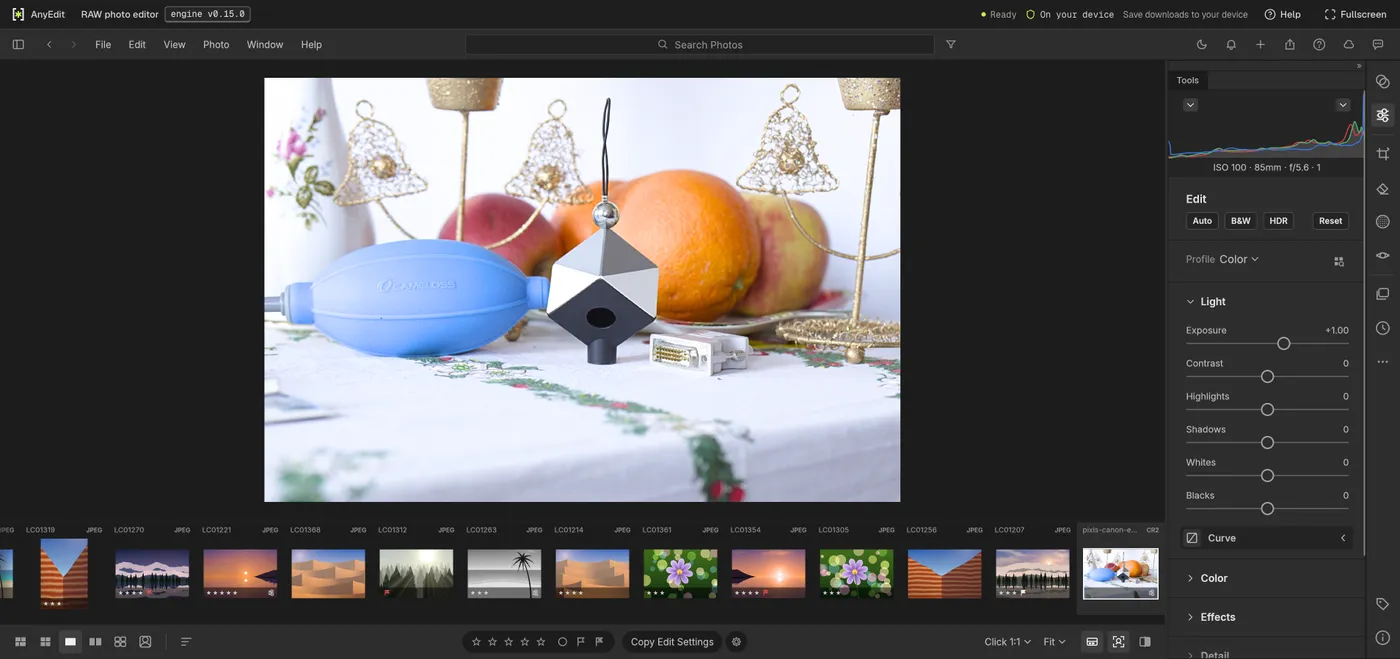
Our test file open in the raw photo editor on anyedit.app, 2026-11-03