Open .arw files online
To open an .arw file in your browser, press Open editor on the RAW photo editor, then choose File > Import Photos and pick your file. The Sony RAW photo joins the editor's library and opens in the develop view with a histogram and exposure, color and tone controls. On 2026-10-19 we opened two public-domain (CC0) ARW files from raw.pixls.us, one from a Sony a6000 and one from a Sony RX100 III, and both showed the right picture and camera details. We raised the exposure of the RX100 III photo to +1.00 and exported it as a full-size JPEG (5472 x 3648, the camera's size), an 8-bit TIFF and a Rendered photo DNG; all three read back correctly in macOS tools (the DNG was not opened in other RAW software), and the average brightness of the TIFF rose from 131 to 153 (out of 255) against the same export at 0.00. The Raw data DNG option did nothing in our test. Two things to know: the library lives in your browser's storage, so keep your original files, and we only tried 12-bit compressed ARW files from two older cameras. Nothing is uploaded and there is no sign-up.
Best on a desktop browser. This editor has desktop menus and shortcuts.
Can I open it?
| Check | Result | Notes |
|---|---|---|
| Listed by the engine | Listed in docs | Sony ARW is listed as supported among the RAW formats. Export lists JPEG, PNG, TIFF, PSD, WebP, AVIF, JPEG XL, DNG and the original file. |
| Opened an .arw file | Works | File > Import Photos with a 25.6 MB ARW from a Sony a6000 (24 MP, 12-bit compressed, a public-domain sample from raw.pixls.us). It was added to the library as ARW and opened in the develop view: a river and forest scene showed, the histogram drew, and the info line read ISO 100, 39 mm, f/5.0, 1/160. The system file chooser worked, so no drag and drop was needed. |
| Opened an .arw from another camera | Works | A 21 MB ARW from a Sony RX100 III (20 MP, also public domain) imported the same way and showed a red toy train with ISO 125, 9 mm, f/2.8, 1/500. It took a few seconds. |
| Edited it | Works | On the RX100 III photo we typed +1 into Exposure in the Light panel. The picture got brighter and the histogram moved right. We did not edit the a6000 photo. |
| Exported as JPEG | Works | File > Export with Full size ticked wrote pixls-sony-rx100m3.jpg, 6.5 MB. The file command and macOS sips read it as a 5472 x 3648 JPEG, which is the RX100 III sensor size, with the camera model SONY DSC-RX100M3 and the software name LightCraft in its metadata. We looked at it and it matched the editor. |
| Exported as TIFF | Works | TIFF with 8-bit depth, ZIP compression and a 2048 px long edge gave a 5.5 MB file named .tif, which sips read as 2048 x 1365, 8-bit. Average brightness (ffmpeg) was 130.8 at exposure 0.00 and 153.3 at +1.00, both exported as TIFF. |
| Exported as DNG (Rendered photo) | Works | The Rendered photo option downloaded a 10.8 MB .dng. sips reads it as a 2048 x 1365 DNG from a Sony RX100 III. Its TIFF tags show DNG version 1.4, 16-bit RGB with the LinearRaw type and Deflate compression, and the software name LightCraft DNG 2. It is a processed picture in a DNG wrapper, not the sensor data. We did not open it in other RAW software. |
| Exported as DNG (Raw data) | Not supported | The Raw data option, described as raw photos as DNG with the edits embedded, did nothing: after OK no download started, and we waited 90 seconds on one attempt. The same option also failed in our DNG test. |
| Other export formats | Not tested yet | The Export dialog also lists PNG, PSD, WebP, AVIF, JPEG XL and Original files. We did not try them. |
| Other ARW variants and newer cameras | Not tested yet | We only tried 12-bit compressed ARW files from two older Sony cameras. Lossless-compressed and uncompressed ARW, and files from newer cameras, are Not tested yet. |
| Phone screen (390 px wide) | Not tested yet | Not tested for this format. |
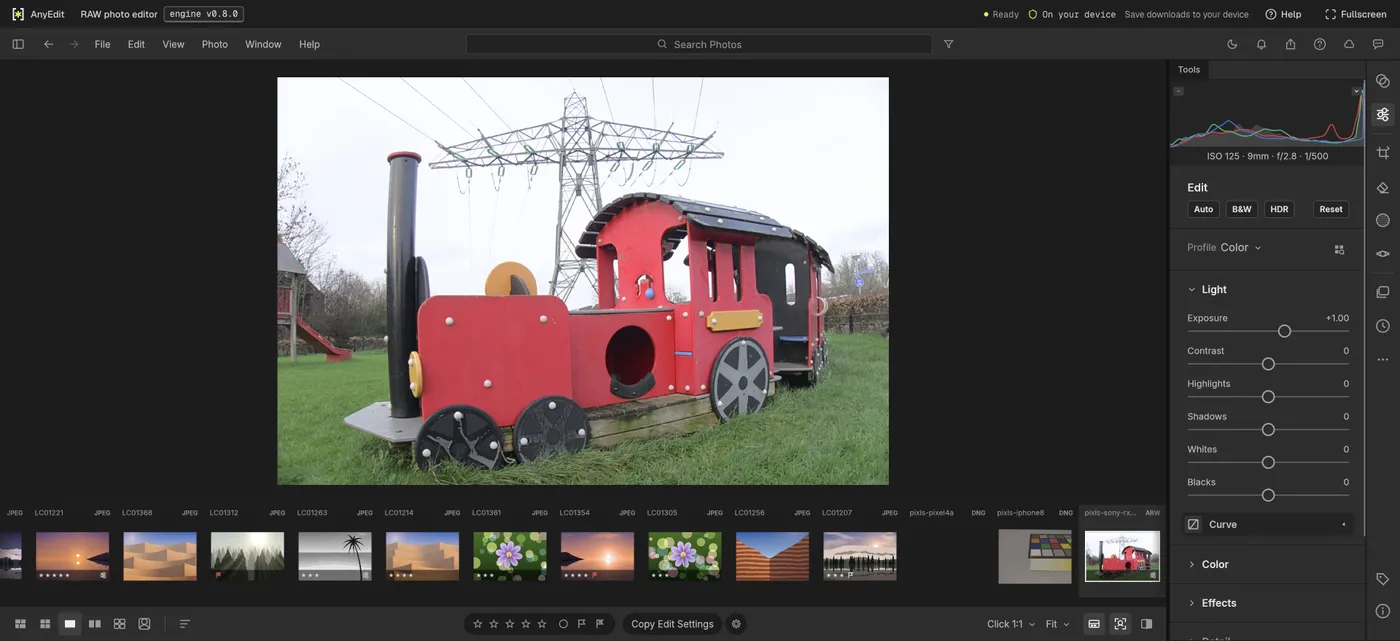
Our test file open in the raw photo editor on anyedit.app, 2026-10-19