Open .ods files online
To open an .ods file in your browser, press Open editor on the spreadsheet editor, choose File > Open > Browse and pick your file. The sheets open with their saved values, and the editor shows a notice that this is a data-only import: formulas become their saved results and will not recalculate, formatting, charts and images are not imported, and ODS cannot be saved back, so you save a new .xlsx. On 2026-10-17 we opened a small .ods with two sheets, text with accents, numbers and formula cells (we wrote it with a Python script). Every value and both sheets showed. We changed a quantity and a price, saved with File > Save As > Download (.xlsx), and read the file back: both sheets and our edits were there, but the Total column had stayed as plain numbers and did not follow our edits. Nothing is uploaded and there is no sign-up.
Best on a desktop browser. This editor has desktop menus and shortcuts.
Can I open it?
| Check | Result | Notes |
|---|---|---|
| Listed by the engine | Listed in docs | ODS worksheet data can be imported, using saved values instead of formulas. ODS is not listed as a save format. |
| Opened an .ods file | Works | File > Open > Browse with a hand-built .ods (written with a Python script: two sheets, a Qty and Price table with text, numbers, the accented text "Café crème" and formula cells that carried saved values). Both sheets, Sheet1 and Notes, appeared with every value. The file opened under the name anyedit-sample (imported).xlsx. A warning dialog and a banner said: ODS data-only import, formulas become their saved results and will not recalculate, source formatting, charts, images and other features are not imported, save a new .xlsx file, ODS saving is not supported. |
| Formula cells | Partial | The formula cells showed their saved results as plain numbers (for example Total 4.5, 8, 6.5 and a sum of 19). They are values, not formulas, so they do not recalculate. |
| Edited it | Works | We typed 5 over the Qty of Apples (was 3) and 4 over the Price of Café crème (was 3.25). The two cells changed, but the Total cells next to them stayed 4.5 and 6.5, and the sum stayed 19. |
| Saved as .xlsx | Works | File > Save As > Download (.xlsx) downloaded "anyedit-sample (imported).xlsx", 4.7 KB. The file command reads it as a Microsoft OOXML file. We unzipped it and read the XML ourselves: both sheets are there, Sheet1 holds our edits (Apples Qty 5, Café crème Price 4) and the accented text, the Total cells are plain numbers with no formulas, and the Notes sheet kept its value 42. We did not open it in Excel or LibreOffice. Our automated browser could not drive the save dialog, so we turned it off and the editor fell back to a normal browser download; the save dialog was not checked by hand. |
| Saved back as .ods | Not supported | Not possible. The Save as type list offers Excel Workbook (.xlsx), CSV UTF-8, Web Page (.html) and PDF, and the notice says ODS saving is not supported. |
| Export as CSV, HTML or PDF from the .ods | Not tested yet | Not tested for this format. |
| Cell styles, charts and a file made by LibreOffice Calc | Not tested yet | The notice says these are not imported. We only opened a plain-data file written by a script, not one saved by LibreOffice. |
| Phone screen (390 px wide) | Not tested yet | Not tested for this format. |
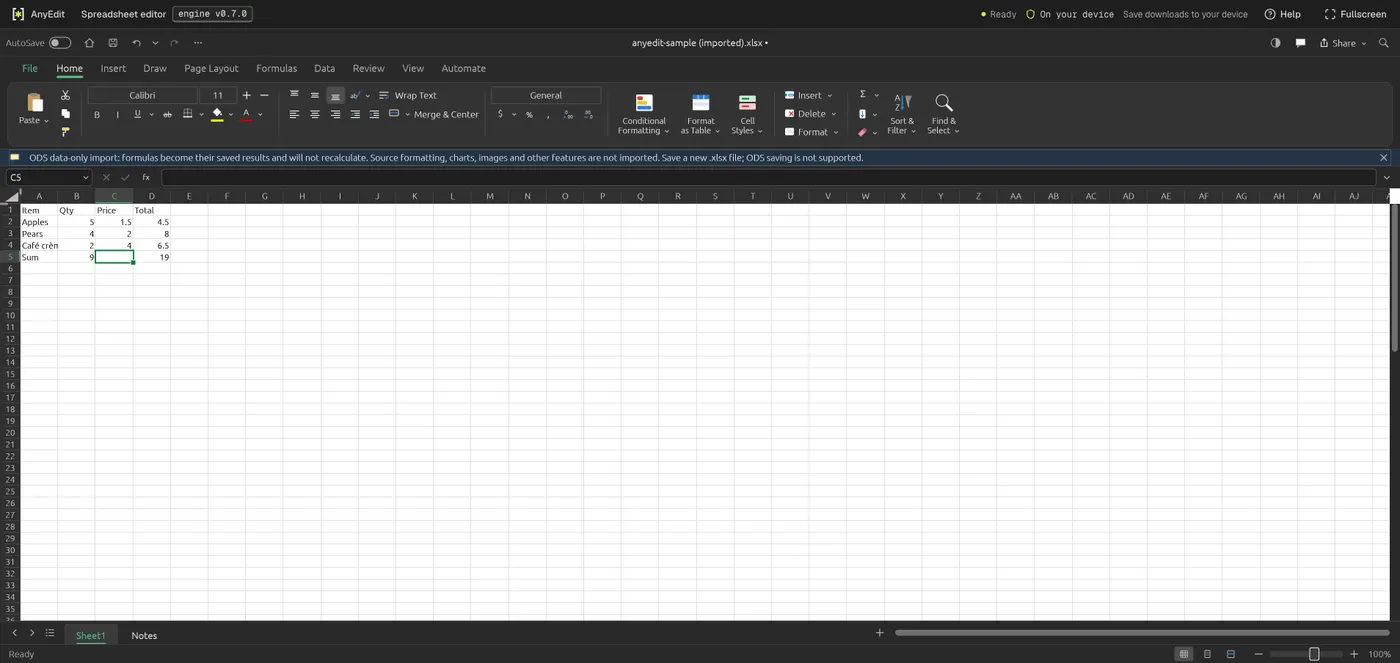
Our test file open in the spreadsheet editor on anyedit.app, 2026-10-17