Open .ora files online
To open an .ora file in your browser, press Open editor on the photo editor, then choose File > Open and pick your file. On 2026-10-26 we opened a five-layer OpenRaster file on anyedit.app. Layer names, order, the layer group, the Multiply and Screen blend modes and a hidden layer all came through, and the hidden layer stayed hidden. We painted a brush stroke on one layer of the group and used File > Save As, which downloaded a Photoshop .psd with the same layers, group, blend modes and the hidden layer, and the opacity values were confirmed in the saved PSD. In our test Save As downloaded a .psd without asking for a format (we did not check a system save dialog). We found no ORA option in Export As either, so we could not confirm that the editor can write .ora and you should check before relying on it. Our test file was written by a Python script following the OpenRaster specification, not saved by Krita, GIMP or MyPaint. Nothing is uploaded and there is no sign-up.
Best on a desktop browser. This editor has desktop menus and shortcuts.
Can I open it?
| Check | Result | Notes |
|---|---|---|
| Listed by the engine | Listed in docs | The engine's notes list OpenRaster as read and write, with layers, groups and blend modes, for Krita, MyPaint and GIMP. We could not confirm writing in our test. |
| Opened a layered .ora | Works | A 400 x 300 OpenRaster file (five PNG layers, one group, written with Python zipfile) opened with all layers in the Layers panel: Hidden note, Shapes group (with Blue ellipse and Red box inside), Green bar and Background. The names and order were right, the group was nested, and the panel labeled the Multiply and Screen layers. The ellipse darkened the red box where they overlap, as Multiply should. |
| Hidden layer and layer positions | Works | The layer set to hidden stayed hidden (no eye icon). Layers kept their positions; for example Red box showed X 40, Y 40. The editor trims each layer to its drawn pixels, so the Hidden note layer showed 81 x 81 px at X 300, Y 10 instead of the full 400 x 300 canvas. |
| Edited it | Works | We selected the Red box layer inside the group and painted a black brush stroke. The stroke showed on the canvas and the document was marked as edited. |
| Saved with File > Save As | Partial | Save As did not ask for a format and downloaded anyedit-sample-layers.psd (a 400 x 300 RGB Photoshop file). The Python psd-tools library read five layers: Background; Green bar at 50% opacity, Screen; the group Shapes group at 80%, holding Red box and Blue ellipse at 70%, Multiply; and Hidden note, still hidden. So layers, group, blend modes, opacity and visibility survived, in PSD form. |
| Saved back as .ora | Not tested yet | Not confirmed. Export As lists PNG, JPG, WebP, TIFF, TGA and ICO, Save for Web (Legacy) starts with JPEG, and Save As gave a .psd in our session, where downloads were used instead of a system save dialog. We did not check whether a system save dialog offers .ora. |
| A file saved by Krita, GIMP or MyPaint | Not tested yet | Not tested. Our file came from a script, so we do not know how files from those apps, with their own extra data, behave. |
| Phone screen (390 px wide) | Not tested yet | Not tested for this format. |
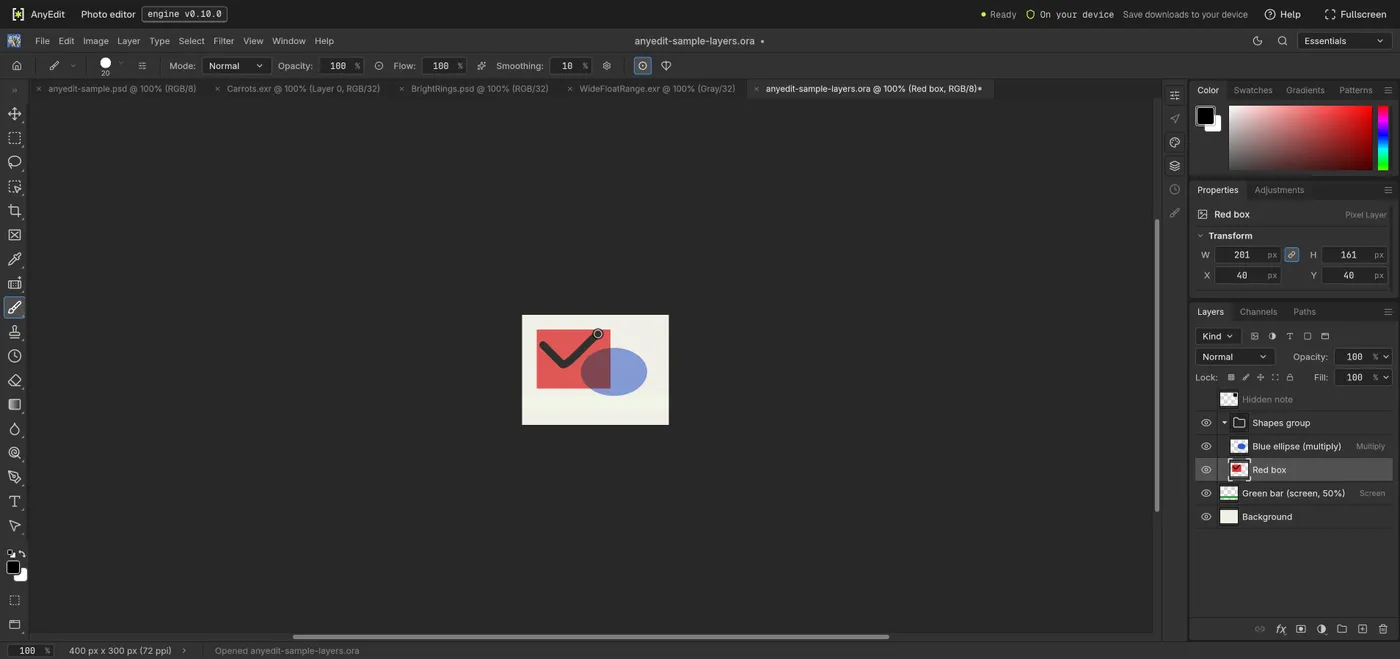
Our test file open in the photo editor on anyedit.app, 2026-10-26