Open .tga files online
To open a .tga file in your browser, press Open editor on the photo editor, then choose File > Open and pick your file. On 2026-10-25 we opened an 800 x 500 24-bit Targa and a 32-bit RLE-compressed Targa with an alpha channel on anyedit.app. Both showed with the right size and colors. We drew a brush stroke on the 24-bit file and exported it with File > Export > Export As and the TGA format: the exported .tga is a valid 800 x 500 24-bit file (RLE-compressed) that contains the stroke, with the original colors unchanged. TGA is one of the Export As formats, next to PNG, JPG, WebP, TIFF and ICO. The alpha file needs care: the editor did not show the transparent area on the canvas; it loaded the alpha as a hidden Alpha 1 channel in the Channels panel. Exporting that file as TGA gave back a 32-bit RLE file whose pixels, alpha values included, were identical to the original. We did not edit the alpha file, and we did not test 16-bit or color-mapped TGA. Nothing is uploaded and there is no sign-up.
Best on a desktop browser. This editor has desktop menus and shortcuts.
Can I open it?
| Check | Result | Notes |
|---|---|---|
| Listed by the engine | Listed in docs | TGA is listed among the flat image formats the photo editor reads, next to BMP, GIF, ICO, QOI, PNM, OpenEXR and Radiance HDR; the upstream notes do not state the TGA write options. |
| Opened a 24-bit .tga | Works | An 800 x 500 uncompressed 24-bit Targa (made with Python Pillow: three color bars and a white rectangle) opened as one Background layer. The document showed 800 px x 500 px, RGB/8, and the colors looked right. |
| Opened a 32-bit RLE .tga with alpha | Partial | An 800 x 500 RLE-compressed 32-bit Targa (a circular hole with alpha 0 and a strip at alpha 128, made with Pillow) opened with the right size and colors. The canvas showed the picture fully opaque, with no hole and no checkerboard. The Channels panel lists RGB, Red, Green, Blue and a hidden Alpha 1 channel, so the transparency was kept as a channel, not as visible transparency. |
| Edited it | Works | We painted a black brush stroke across the orange bar of the 24-bit file. The stroke showed on the canvas and the document was marked as edited. |
| Exported as TGA | Works | File > Export > Export As > TGA downloaded anyedit-sample.tga (27.9 KB). The file command reads it as Targa 800 x 500 x 24, RLE; Python Pillow and the macOS sips tool read it too. The stroke pixels were black and the orange, navy, teal and white samples were exactly the original colors. Our original was uncompressed, so the export compresses with RLE. |
| Exported the alpha file as TGA | Works | We exported the opened alpha file without editing it. The result was a 32-bit RLE Targa with an 8-bit alpha channel, and a pixel-by-pixel comparison with Pillow found no difference from the original, including the alpha 0 hole and the alpha 128 strip. |
| Edited a file with alpha | Not tested yet | Not tested. We did not paint on the alpha file, so we do not know how the hidden Alpha 1 channel behaves after an edit. |
| 16-bit, color-mapped or old-style TGA | Not tested yet | Not tested for this format. |
| Phone screen (390 px wide) | Not tested yet | Not tested for this format. |
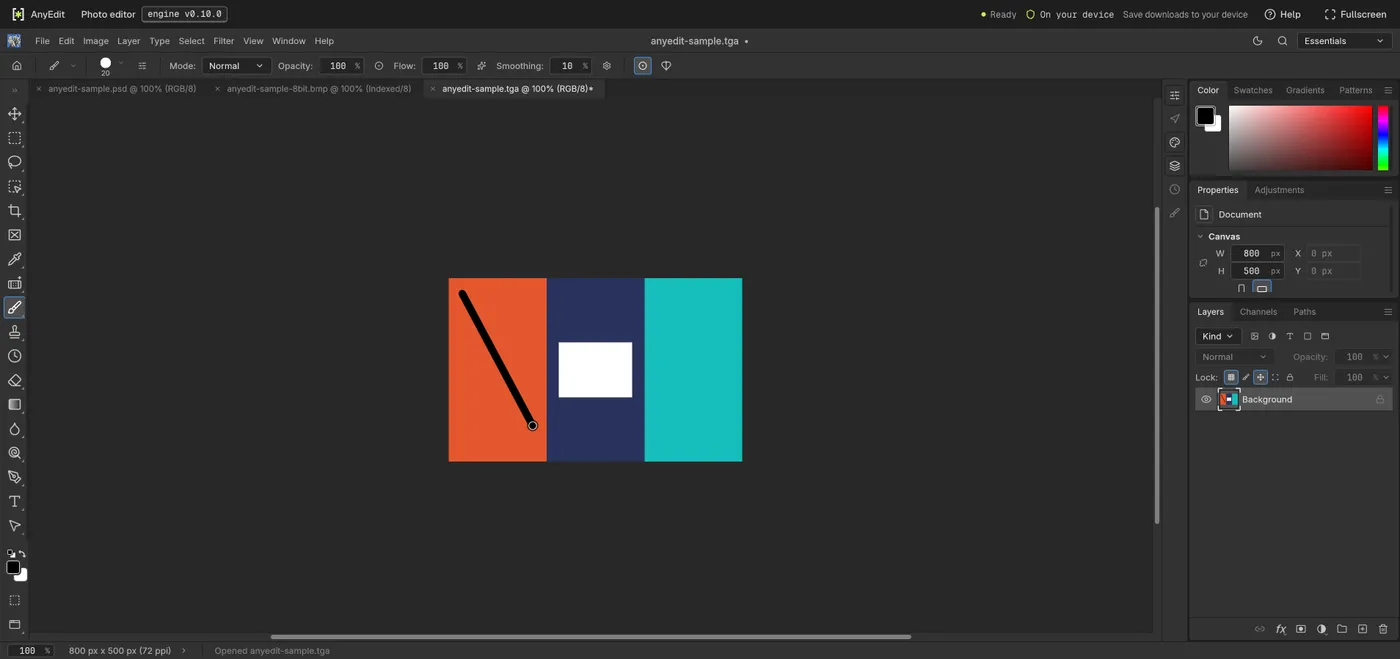
Our test file open in the photo editor on anyedit.app, 2026-10-25