Open .webp files online
To open a .webp file in your browser, press Open editor on the photo editor, then choose File > Open and pick your file. On 2026-10-31 we opened an 800 x 500 lossy WebP and an 800 x 500 lossless WebP with a transparent hole, both made with Google's cwebp tool. Both opened with the right size and colors, and the transparent area showed as a checkerboard. We drew a brush stroke on each and used File > Export > Export As with the WebP format. The lossless export was a valid lossless WebP in which only the stroke had changed. The lossy export was a valid 800 x 500 lossy WebP, 6 KB at the default quality of 85. With Transparency ticked, the transparent hole stayed fully transparent in both lossy and lossless output. One quirk: our lossy file with transparency came out at 406 KB because the alpha channel is stored uncompressed, so choose Lossless if you need a small file with transparency. We did not test animated WebP, very large files or other cwebp options. Nothing is uploaded and there is no sign-up.
Best on a desktop browser. This editor has desktop menus and shortcuts.
Can I open it?
| Check | Result | Notes |
|---|---|---|
| Listed by the engine | Listed in docs | WebP (lossy and lossless) is listed among the flat image formats the photo editor reads and writes, next to PNG, JPEG, GIF, BMP, TGA and ICO. Animated WebP is not mentioned. |
| Opened a lossy .webp | Works | An 800 x 500 lossy WebP (VP8, made with cwebp at quality 80, three color bars and a white rectangle) opened as one Background layer. The document showed 800 px x 500 px, RGB/8, and the colors looked right. |
| Opened a lossless .webp with transparency | Works | An 800 x 500 lossless WebP with a fully transparent ellipse opened as one layer called Layer 0, and the ellipse showed as a checkerboard. We did not check partly transparent (soft) edges. |
| Edited it | Works | We drew a black brush stroke over the orange bar on each file. It showed on the canvas and the document title gained an edit marker. |
| Exported as lossless WebP | Works | File > Export > Export As with WebP and Lossless ticked (the default) wrote a 26 KB file. The webpinfo tool reads it as lossless (VP8L), 800 x 500. Pillow read it back: sampled colors matched the source, about 8,700 new black pixels from the stroke, and no other pixel changed. |
| Exported as lossy WebP | Works | Unticking Lossless shows a Quality field (85 by default). The export was a 6 KB lossy (VP8) 800 x 500 file. Colors stayed within a few levels of the source (mean difference about 3 on a 0 to 255 scale) and the stroke was black. |
| Transparency kept on export | Works | With Transparency ticked, the transparent ellipse (23,823 pixels at alpha 0) was exactly the same in the lossless output and in the lossy output, checked with Pillow. |
| Lossy WebP with transparency size | Partial | The lossy file with transparency was 406 KB, against 6 KB without it: webpinfo shows a 400 KB uncompressed alpha chunk. The picture is correct; the file is just large. The lossless export of the same image was 11 KB. |
| Animated WebP | Not tested yet | Not tested for this format. |
| Phone screen (390 px wide) | Not tested yet | Not tested for this format. |
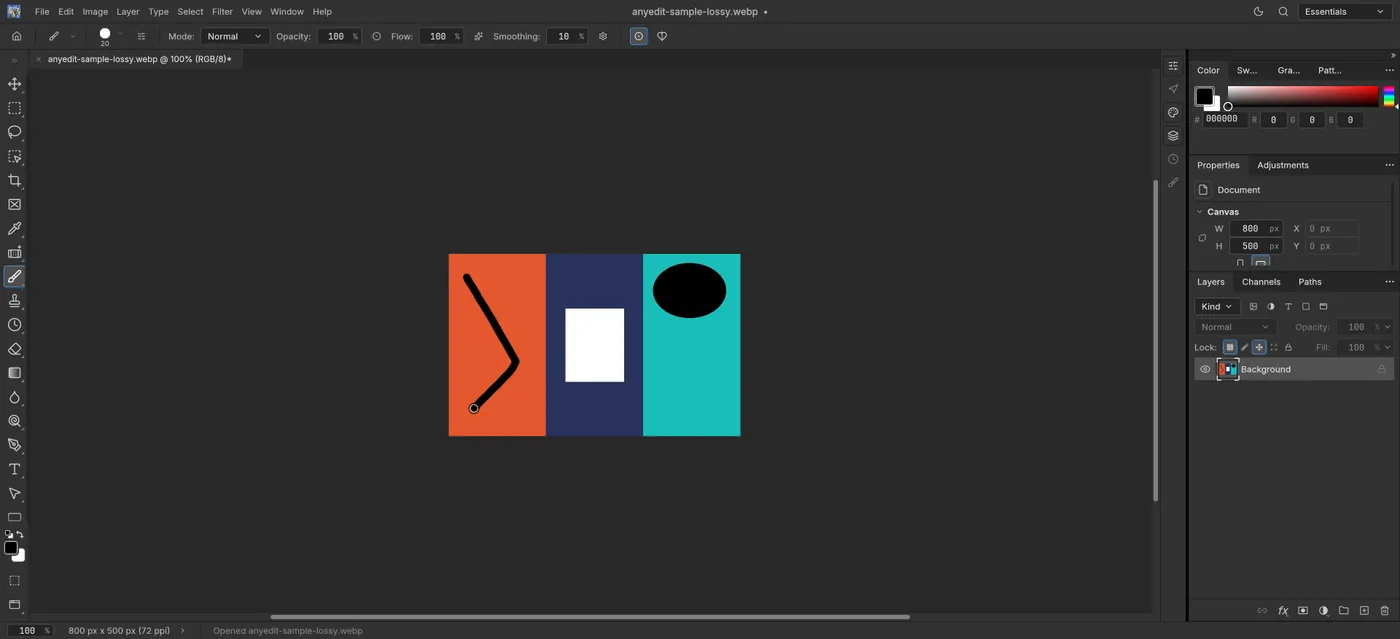
Our test file open in the photo editor on anyedit.app, 2026-10-31