Open .mp3 files online
To open an .mp3 file in your browser, press Open editor on the audio editor, then choose File > Import > Audio and pick your file. The MP3 is decoded and added as a new audio track with its waveform, and you can edit it there. On 2026-10-18 we imported a 3-second MP3 made with ffmpeg and a 3 minute 18 second public-domain (CC0) MP3 from Wikimedia Commons (320 kbps); both showed up as waveform clips with their full length. We lowered the first by 12 dB and normalized the second with the AudioSuite menu. The editor cannot save an MP3: File > Bounce Mix offers WAV, AIFF and FLAC only, so MP3 is import only. We exported both edits and checked them with ffprobe and a script: the WAV was 3.000 seconds and exactly 12 dB quieter than the source, and the FLAC kept the full 3:18 length and matched the original to about -77 dB after the gain change. Things to know: the export is 48 kHz (the session rate), a bounce mixes every unmuted track in the session, and the MP3 title and artist tags were not carried over. We also imported an .ogg file the same way. We did not listen to playback. Nothing is uploaded and there is no sign-up.
Best on a desktop browser. This editor has desktop menus and shortcuts.
Can I open it?
| Check | Result | Notes |
|---|---|---|
| Listed by the engine | Listed in docs | MP3, Ogg Vorbis, AAC, ALAC, CAF and the audio of MP4/MOV movies are listed for import. Bounce is to WAV, AIFF or FLAC. |
| Opened an .mp3 file | Works | A 3-second stereo MP3 made with ffmpeg (44.1 kHz, 128 kbps, with ID3 title and artist tags) was added with File > Import > Audio. The status bar said Imported anyedit-sample.mp3, a new audio track appeared with a clip named after the file, and the clip showed as 2 channels. The system file chooser worked, so no drag and drop was needed. |
| Opened an .mp3 from another source | Works | A public-domain (CC0) street recording from Wikimedia Commons (3 minutes 18 seconds, 320 kbps, 7.9 MB) imported in a few seconds as a stereo clip with its full waveform visible. The exported FLAC later came out at the same 3:18.66 length. |
| Edited it | Works | We selected the small clip and used AudioSuite > Other > Gain with -12 dB, then Render. The clip was replaced by a rendered one named anyedit-sample-gain. On the long file we used AudioSuite > Other > Normalize to -0.1 dB peak. |
| Exported as .mp3 | Not supported | There is no MP3 export. File > Bounce Mix offers WAV, AIFF and FLAC (with a bit depth and a normalize option). The File > Export submenu holds only AAF/OMF, session, MIDI, Sibelius and session-info items. If you need an MP3 at the end, you will have to convert the exported file elsewhere. |
| Exported the edit as WAV | Works | We bounced the gain-edited clip as WAV (24-bit). The browser downloaded a file that macOS file reads as a RIFF WAVE file, and afinfo and Python read it as 2 channels, 48,000 Hz, 24-bit, exactly 3.000 seconds. Measured in 0.25 second blocks, it was 12.0 dB quieter than the MP3 source (-21.0 to -33.0 dBFS), and a frequency check found the 440 Hz and 660 Hz tones of our test file and nothing at 550 Hz. |
| Exported the edit as FLAC | Works | We bounced the normalized long clip as FLAC (24-bit). ffprobe read it as FLAC, 48,000 Hz, stereo, 24-bit, 3:18.66, the same length as the source. After the first minute, where nothing else plays in the session, it matched the original MP3 to about -77 dB after a gain change of -0.14 dB. Its peak was about -0.3 dBFS. |
| What the export contains | Partial | A bounce renders the edit selection (or the whole session) and mixes every unmuted track, so in the demo project we muted the other tracks first. The sample rate is the session rate of 48 kHz, not the 44.1 kHz of the MP3, and the MP3 title and artist tags were not in the exported WAV or FLAC. |
| Opened an .ogg file | Works | A 3-second Ogg Vorbis file made with ffmpeg was imported the same way. The status bar said Imported anyedit-sample.ogg and a new track appeared. We did not edit or export it, and no Ogg export is offered. |
| Playback and sound | Not tested yet | We did not play the tracks, so we cannot say how they sound. |
| Phone screen (390 px wide) | Not tested yet | Not tested for this format. |
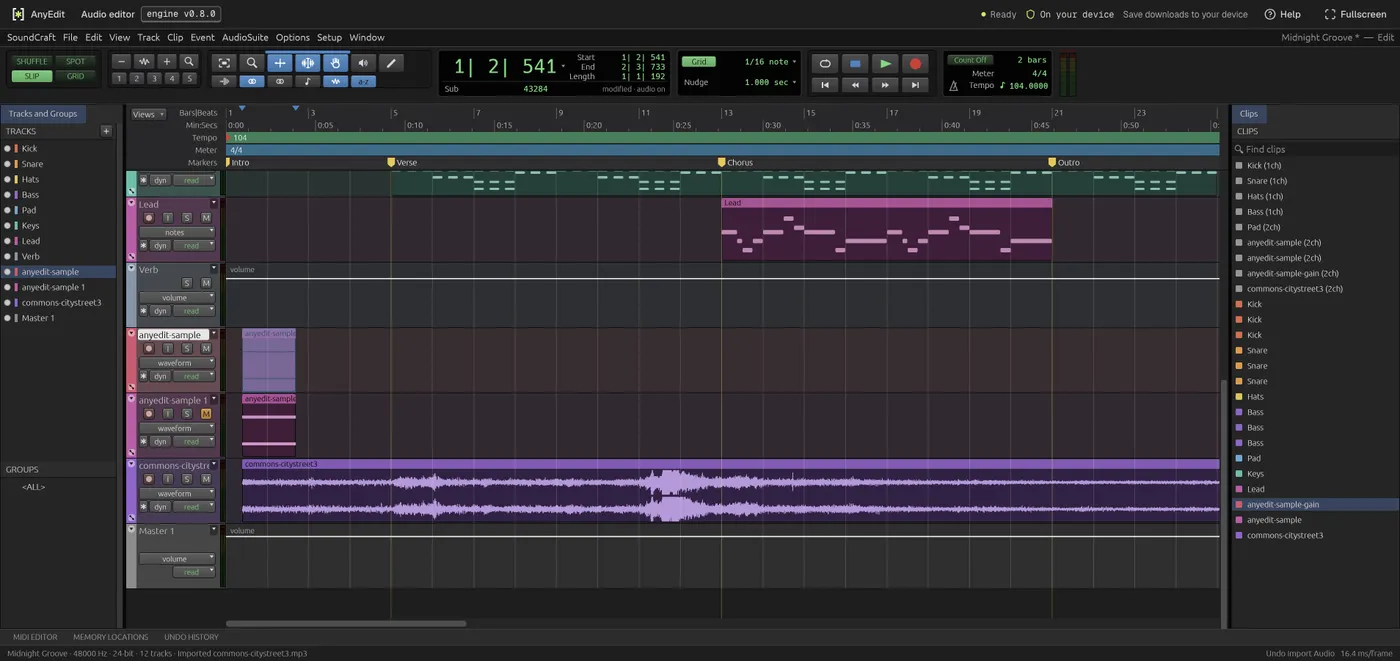
Our test file open in the audio editor on anyedit.app, 2026-10-18