Open .midi files online
To open a .mid or .midi file in your browser, press Open editor on the audio editor and drop your file onto the editor window. Each track in the file becomes an instrument track with its notes drawn as a piano roll, and you can edit it there. On 2026-10-16 we opened a small two-track .mid (an 8-note melody and a 4-note bass line) and a public-domain Bach file from Wikimedia Commons with four tracks and about 3,700 notes. Both opened with the right number of tracks, and the notes showed in the piano rolls. We moved the melody up 2 semitones with Event > MIDI Operations > Transpose and exported with File > Export > MIDI. The new .mid was a valid Standard MIDI File, and a parser showed all 8 melody notes two semitones higher with the same timing, while the bass was unchanged. Things to know: importing replaced the session tempo with the one in the file, the exported file holds all MIDI tracks of the session (in our test, also the demo project tracks), and our test browser cannot fill the system file picker, so we loaded the files by dropping them and did not use File > Import by hand. We did not listen to playback. Nothing is uploaded and there is no sign-up.
Best on a desktop browser. This editor has desktop menus and shortcuts.
Can I open it?
| Check | Result | Notes |
|---|---|---|
| Listed by the engine | Listed in docs | Standard MIDI File import and export, with instrument tracks, a piano-roll MIDI editor with a velocity lane, quantize and transpose. |
| Opened a .mid file | Works | A small two-track format 1 .mid (an 8-note melody and a 4-note bass line, made with a Python script) was dropped onto the editor. The status bar said it was imported, and two new instrument tracks appeared, Melody and Bass, with the notes drawn as a piano roll. The bass track was renamed Bass 1 because the session already had a track called Bass. |
| Opened a .mid from another source | Works | A public-domain Bach file from Wikimedia Commons (BWV 230, format 1, four note tracks of about 830 to 975 notes each) was imported as four tracks, MIDI 1 to MIDI 4, with long phrases visible in the piano rolls. The session tempo and meter changed to the file values (140 bpm, 4/2). |
| Edited it | Works | We selected the Melody clip and used Event > MIDI Operations > Transpose with 2 semitones. The status bar then offered Undo Transpose. |
| Exported as .mid | Works | File > Export > MIDI asked for a file name and then downloaded a 1.7 KB .mid. The macOS file command reads it as Standard MIDI data (format 1, 5 tracks, 960 ticks per beat). A Python parser showed the Melody track with 8 notes at pitches 62, 64, 66, 67, 69, 71, 73, 74, which is our original 60 to 72 scale moved up 2, with the same one-beat spacing. The Bass 1 track kept its 4 notes (48, 43, 45, 41) and program number. Our automated browser could not drive the save dialog, so we turned it off and the editor fell back to a normal browser download; the save dialog was not checked by hand. |
| What the export contains | Partial | The exported file held every MIDI track in the session, including the demo project Keys and Lead tracks (180 and 20 notes), and none of the audio tracks. The notes of our melody start at bar 5 of the session, where the clip was placed, not at the beginning of the file. The source file tempo (120 bpm) replaced the session tempo of 104 on import. |
| Import menu with a file chooser | Not tested yet | We loaded the files by dropping them onto the editor and did not use File > Import with the system file picker. |
| Playback and sound | Not tested yet | We did not play the tracks, so we cannot say how they sound. |
| Phone screen (390 px wide) | Not tested yet | Not tested for this format. |
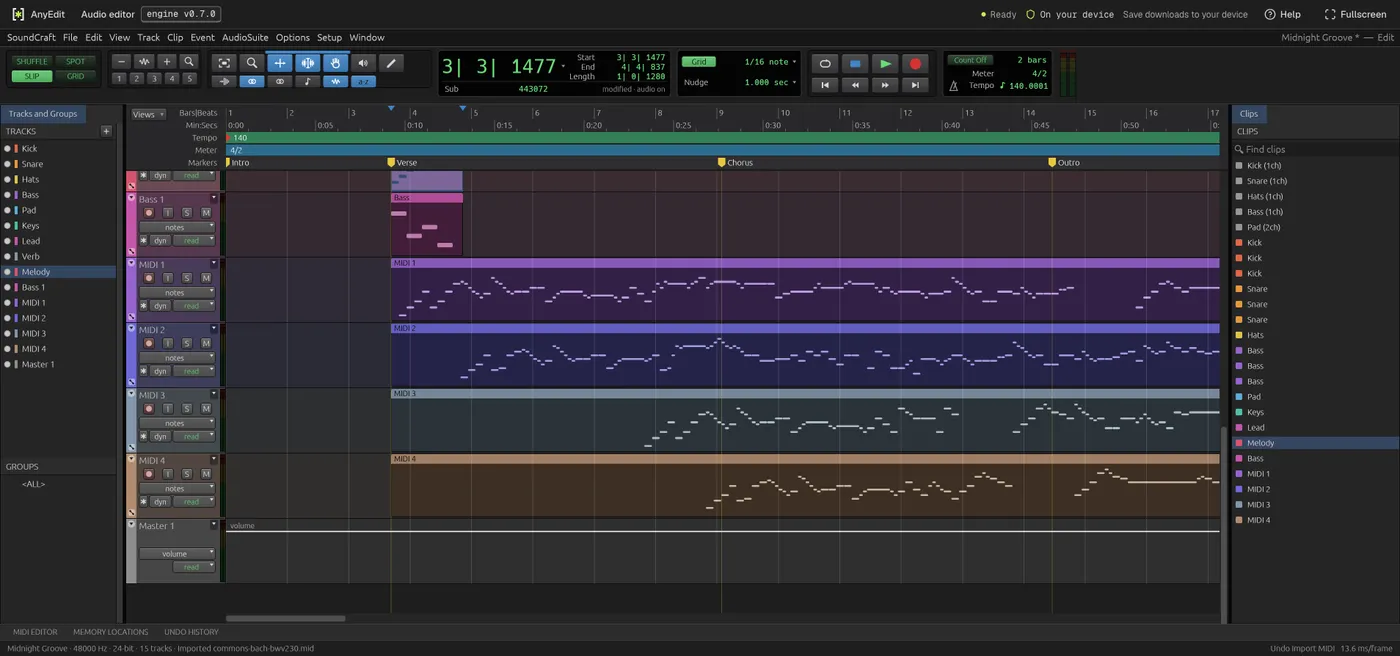
Our test file open in the audio editor on anyedit.app, 2026-10-16