Open .doc files online
To open a .doc file in your browser, press Open editor on the document editor, then choose Open inside the editor and pick your file (in our automated test we loaded the files by dropping them onto the editor; the Open file picker was not checked by hand). On 2026-10-14 we opened a Word-made .doc with a heading and several lists on anyedit.app and it showed correctly, and a Word-made 3 x 3 table opened with its borders. We added a word to the heading and saved a copy with Export as .docx; the .docx was a valid Word file that kept the edit and all the list items. Two things to know: the editor only reads .doc, so you cannot save back to .doc (use .docx), and a .doc written by the macOS textutil tool was refused as malformed, so a rare or oddly written .doc may not open. Nothing is uploaded and there is no sign-up.
Best on a desktop browser. This editor has desktop menus and shortcuts.
Can I open it?
| Check | Result | Notes |
|---|---|---|
| Listed by the engine | Listed in docs | The editor lists Word 97-2003 .doc as an import format only. DOCX is read and written, and ODT, RTF, HTML, Markdown and TeX are imported and exported. |
| Opened a .doc file | Works | A Word 2010 .doc with a heading and bulleted, numbered and multi-level lists opened across 2 pages with the right text and numbering. Two bullet symbols from a symbol font showed as letters (a tick as "ü", one bullet as "v"). |
| Opened a .doc with a table | Works | A Word-made 3 x 3 table opened with all nine cells and borders. An extra narrow empty column showed at the right edge. |
| Opened a .doc made by another tool | Not supported | A small .doc written by the macOS textutil tool did not open. The editor showed "not a Word document (compound file): Malformed MiniFAT" and loaded nothing from the file; the document that was already open stayed as it was. We did not check whether Word opens that file. |
| Edited it | Works | We clicked at the end of the heading and typed " edited". The text changed and the file tab showed it as edited. |
| Exported as .docx | Works | Export has no .doc option. Export > Word document (*.docx) gave a valid .docx. Reading its XML showed the edited heading, every list item and 28 list paragraphs. The editor opened the .docx again with the same text and lists. |
| Saved back as .doc | Not supported | There is no .doc output. The Export page lists PDF, DOCX, XML, ODT, RTF, HTML, Markdown, LaTeX, TXT and PNG only. |
| Phone screen (390 px wide) | Not tested yet | Not tested for this format. |
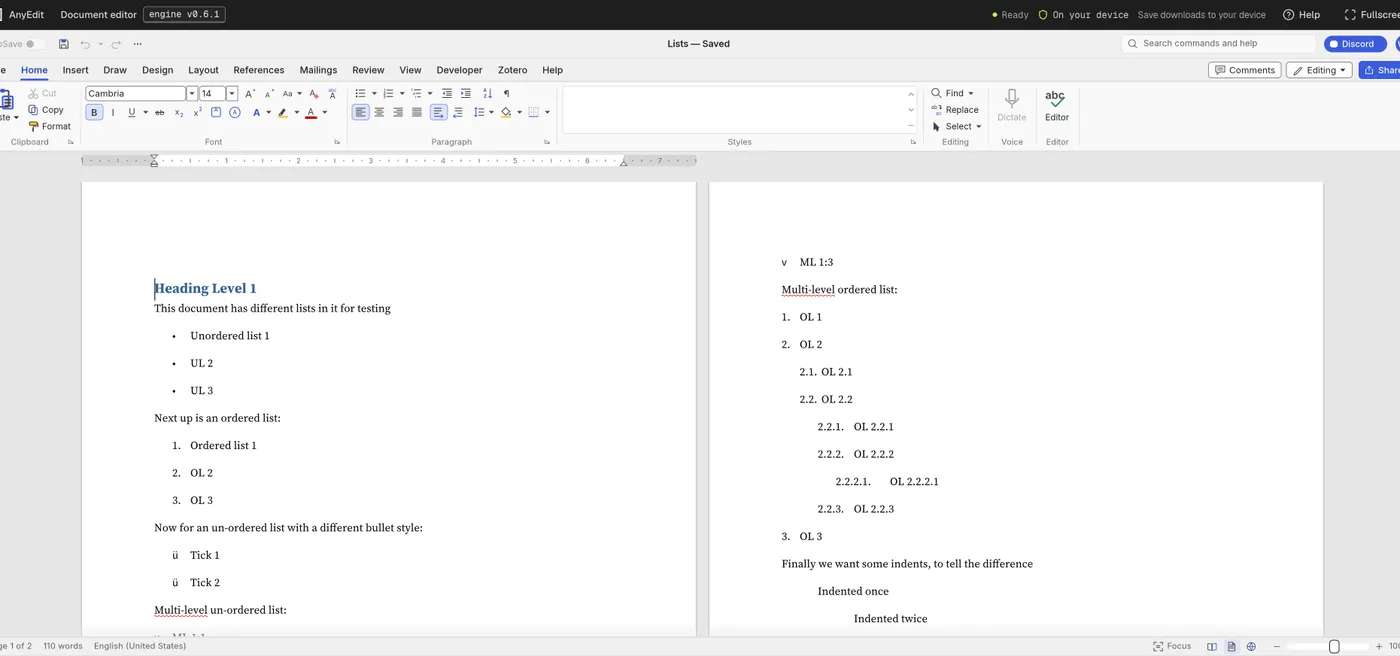
Our test file open in the document editor on anyedit.app, 2026-10-14