Open .docx files online
To open a .docx file in your browser, press Open editor on the document editor, choose Open > Browse and pick your file. On 2026-11-03 we opened a one-page test document in WordCraft 0.12.0 on anyedit.app. A title, two Heading 1 lines, bold and italic text, a bulleted and a numbered list, a 3 x 3 table with borders and a picture all showed in place. Japanese text (日本語) showed as empty boxes on screen because the editor had no font for it, but the text was still in the file. We added a sentence to the last paragraph and pressed Ctrl+S, which downloaded a .docx. The python-docx library read it back with the same paragraph styles (Title, Heading 1, List Bullet, List Number), the bold and italic runs, the table, one picture byte-for-byte identical to ours, the Japanese text and our new sentence. The file was made with python-docx, not Word, and has no tracked changes, comments, headers, footnotes or fields, so those are Not tested yet. The project calls the editor alpha, so check a real document before you rely on it. Nothing is uploaded; the file is read in your browser.
Best on a desktop browser. This editor has desktop menus and shortcuts.
Can I open it?
| Check | Result | Notes |
|---|---|---|
| Listed by the engine | Listed in docs | DOCX read and write, plus ODT, RTF, HTML, Markdown and TeX import and export. The editor is still in alpha. |
| Opened a .docx | Works | Open > Browse with anyedit-sample-report.docx (made with python-docx, 37.6 KB): title, Heading 1, bold and italic, bullets, a numbered list, a 3 x 3 table and a picture, on 1 page and 40 words. The editor opened at 223 percent zoom, so we zoomed out to see the page. |
| Japanese text on screen | Partial | The word 日本語 displayed as empty boxes. The saved file still held the text. |
| Edited text | Works | We added Edited online. to the last paragraph; the word count went from 40 to 42. |
| Saved as .docx (Ctrl+S) | Works | Downloaded anyedit-sample-report.docx, 42.1 KB, a Microsoft Word 2007+ file written by WordCraft. python-docx read the styles Title, Heading 1, Normal, List Bullet and List Number, the bold and italic runs, the table (Table Grid style) and one picture of 2.0 x 1.0 inches whose bytes matched our PNG. The last paragraph read: Closing line with 日本語. Edited online. |
| Other formats exported as .docx (2026-10-14 and 2026-10-15) | Works | A Word-made .doc, an RTF and an ODT each exported as .docx. See the .doc, .rtf and .odt pages. |
| Tracked changes, comments, headers, footers, footnotes, fields | Not tested yet | Not tested yet. Our file had none. |
| Word-made files and long documents | Not tested yet | Not tested yet. |
| Phone screen (390 px wide) | Not tested yet | Not tested for this format. |
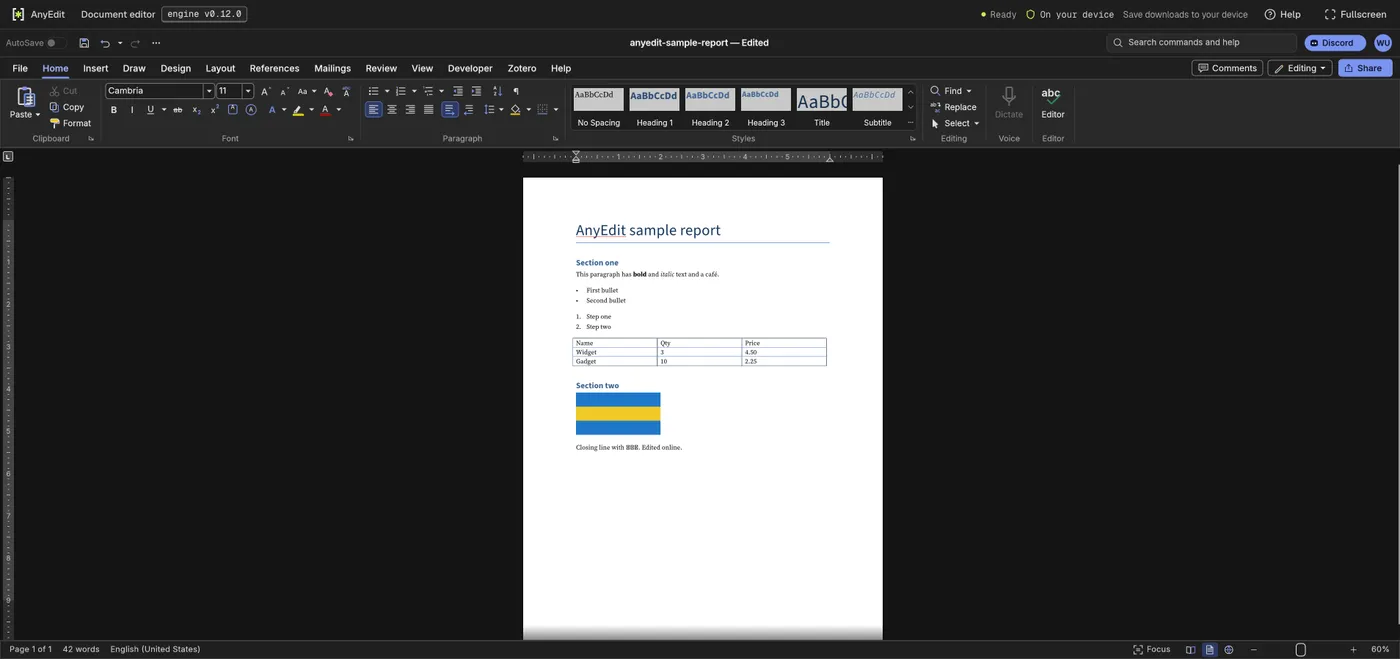
Our test file open in the document editor on anyedit.app, 2026-11-03