Open .rtf files online
To open an .rtf file without Word, press Open editor on the document editor and choose Open inside the editor (in our automated test we loaded the files by dropping them onto the editor; the Open file picker was not checked by hand). On 2026-10-15 we opened a small .rtf with a heading, bold, italic and red text, three bullets and a table, and all of it showed correctly. A second .rtf made in Word, with numbered, bulleted and nested lists, also opened, but its nested items sat at the wrong indent. We typed a word into the heading and used Export > Rich Text Format (*.rtf) to save a copy. The new file kept the edit, the bold, italic and colour, the bullets and the table, and the editor opened it again with the same content (the list text sat about 3 px further right). Nothing is uploaded and there is no sign-up.
Best on a desktop browser. This editor has desktop menus and shortcuts.
Can I open it?
| Check | Result | Notes |
|---|---|---|
| Listed by the engine | Listed in docs | RTF is imported and exported by the document editor, alongside DOCX (read and write), ODT, HTML, Markdown, TeX and TXT. The editor is still in alpha. |
| Opened an .rtf file | Works | A small .rtf with a heading, a line with bold, italic and red text, three bullets and a 3-row table opened with the right text, styling and table borders on one page. |
| Opened an .rtf made in Word | Partial | A Word-made .rtf with numbered, bulleted and nested lists opened with all the text and the numbering. In the nested list, the two sub-items showed as bullets with less indent than their parent item, so the nesting looked wrong. |
| Edited it | Works | We clicked at the end of the heading and typed " edited". The text changed and the file tab showed it as edited. |
| Exported as .rtf | Works | Export > Rich Text Format (*.rtf) gave a 4 KB file that the macOS file command reads as Rich Text Format data. Its text included the edited heading, and its codes held the bold, italic, the red colour, 3 list paragraphs and a table of 3 rows. macOS textutil read the text back. The editor opened the exported file again with the same content, with the list text about 3 px further right. Our automated browser could not drive the save dialog, so we turned it off and the editor fell back to a normal browser download; the save dialog was not checked by hand. |
| Exported as .docx | Works | Export > Word document (*.docx) gave a valid .docx whose XML held the edited heading, bold, italic, red, three list paragraphs and one table. |
| Fonts after export | Partial | Our sample named its fonts "Times-Bold", "Times-Roman" and so on. The editor showed those names as they were and the exported .rtf kept them, so check the fonts if they matter. |
| Images, links and other .rtf features | Not tested yet | Not tested for this format. |
| Phone screen (390 px wide) | Not tested yet | Not tested for this format. |
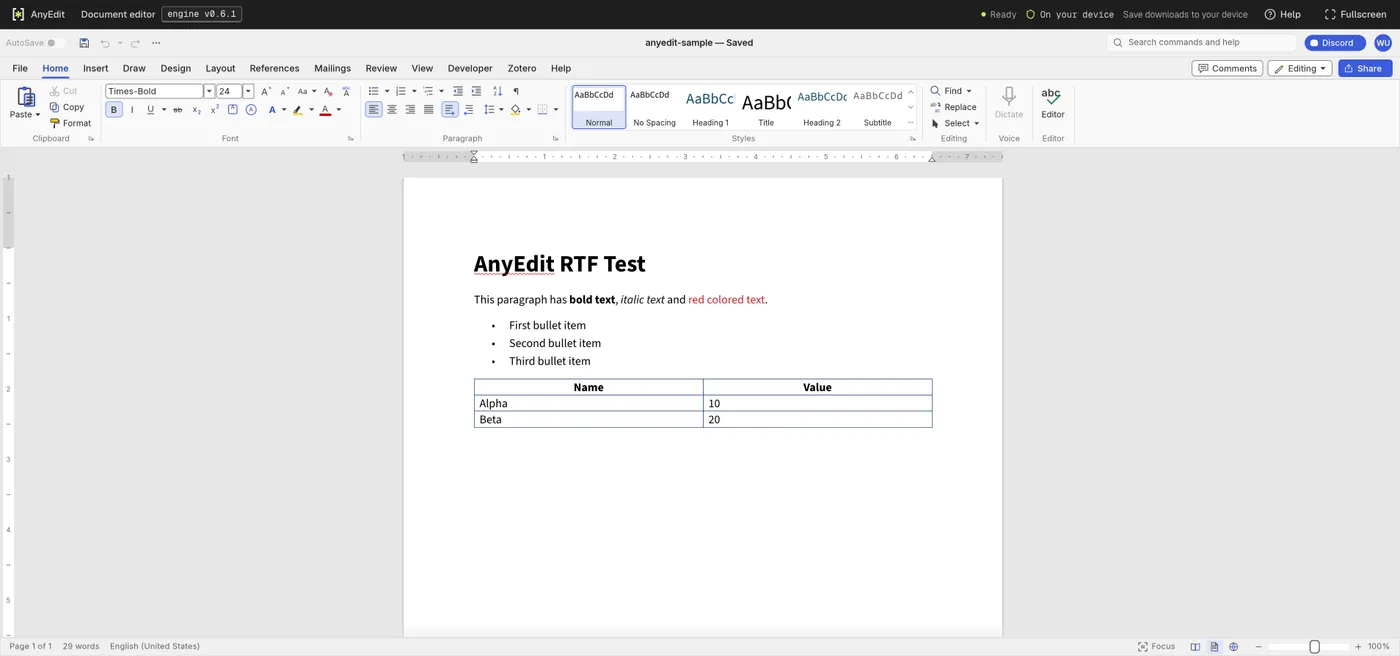
Our test file open in the document editor on anyedit.app, 2026-10-15