Open .md files online
To open an .md file in your browser, press Open editor on the document editor and open your file there (in our automated test we loaded the files by dropping them onto the editor; the Open file picker was not checked by hand). The editor is a Word-style editor, not a split-screen Markdown previewer: it turns the Markdown into a formatted document, with no live preview pane. On 2026-10-20 we opened a small .md with headings, bold, italic, strikethrough, nested bullets, a numbered list, a table, a code block, a quote, a link and an image, and all of it showed as formatted text. We edited the heading and exported with Export > Markdown (*.md). The file had the same structure, and an independent Markdown parser counted the same headings, lists, table, code block, link and image in the original and the export. A few details change on the way out: the code language label is dropped, the image becomes a link to image.png with no picture file saved, and an image that points to a file we do not have showed only its alt text. Mermaid diagrams, math and footnotes are Not tested yet. Nothing is uploaded and there is no sign-up.
Best on a desktop browser. This editor has desktop menus and shortcuts.
Can I open it?
| Check | Result | Notes |
|---|---|---|
| Listed by the engine | Listed in docs | Markdown (.md) is imported and exported by the document editor, alongside DOCX (read and write), ODT, RTF, HTML, TeX and TXT. The editor is still in alpha. |
| Opened an .md file | Works | A small .md with a heading, a paragraph with bold, italic, strikethrough and a link, nested bullets, a numbered list, a 3-column table, a code block, inline code, a quote and an embedded image opened as one formatted page of 57 words. Headings took the heading styles, the table had borders with the numbers right-aligned as written, the code showed in a monospace font and the image was drawn. The editor shows the result as a document you can edit, with no raw Markdown beside it. |
| Opened a longer .md | Works | A 2 KB file with bullet lists, nine tables, accented text (Café crème, naïve — résumé) and a relative image link opened as 3 pages, 240 words, with the accents correct. An image that pointed to a file we did not provide showed only its alt text. A task list written as [ ] and [x] showed as plain bullets with the brackets as text, not checkboxes. |
| Edited it | Works | We clicked at the end of the heading and typed " edited". The text changed and the title bar changed from Saved to Edited. |
| Exported as .md | Works | Export > Markdown (*.md) gave a 510-byte UTF-8 file named anyedit-sample.md. It holds # and ## headings, **bold**, *italic*, ~~strikethrough~~, the link, a nested list, a numbered list, a pipe table with alignment markers, a fenced code block, inline code, a quote and an image line. A Markdown parser (marked) found the same elements before and after: 1 H1, 3 H2, 8 list items, 1 table, 1 code block, 1 link, 1 image, 1 quote. The edited heading was in it. |
| What changes in the exported .md | Partial | The code block lost its language label (python became a bare fence). The image was written as : the picture itself was not saved as a file, so the link points to nothing until you add one. Nested bullets are indented four spaces. Table separators become | --- | ---: |. The line breaks between the bullet list and the numbered list were not kept as a blank line. In the long file, a relative image was dropped (alt text kept as plain text) and the task list brackets were escaped as \[ \]. |
| Opened the exported .md again | Works | We dropped the exported file onto the editor again. The heading with the edit, bold, italic, lists, table and code all showed again. |
| Exported as .docx | Works | Export > Word document (*.docx) gave a valid .docx (file reads it as Microsoft Word 2007+) with heading styles, one table, one hyperlink, one embedded image (the original picture), 8 list paragraphs and a quote style. We did not open it in Word itself. |
| Links | Partial | The link text showed in plain text colour, with no blue or underline in the editor. The link itself was kept in the exported .md and in the .docx. |
| Mermaid, math, footnotes, front matter, raw HTML | Not tested yet | Not tested for this format. |
| Phone screen (390 px wide) | Not tested yet | Not tested for this format. |
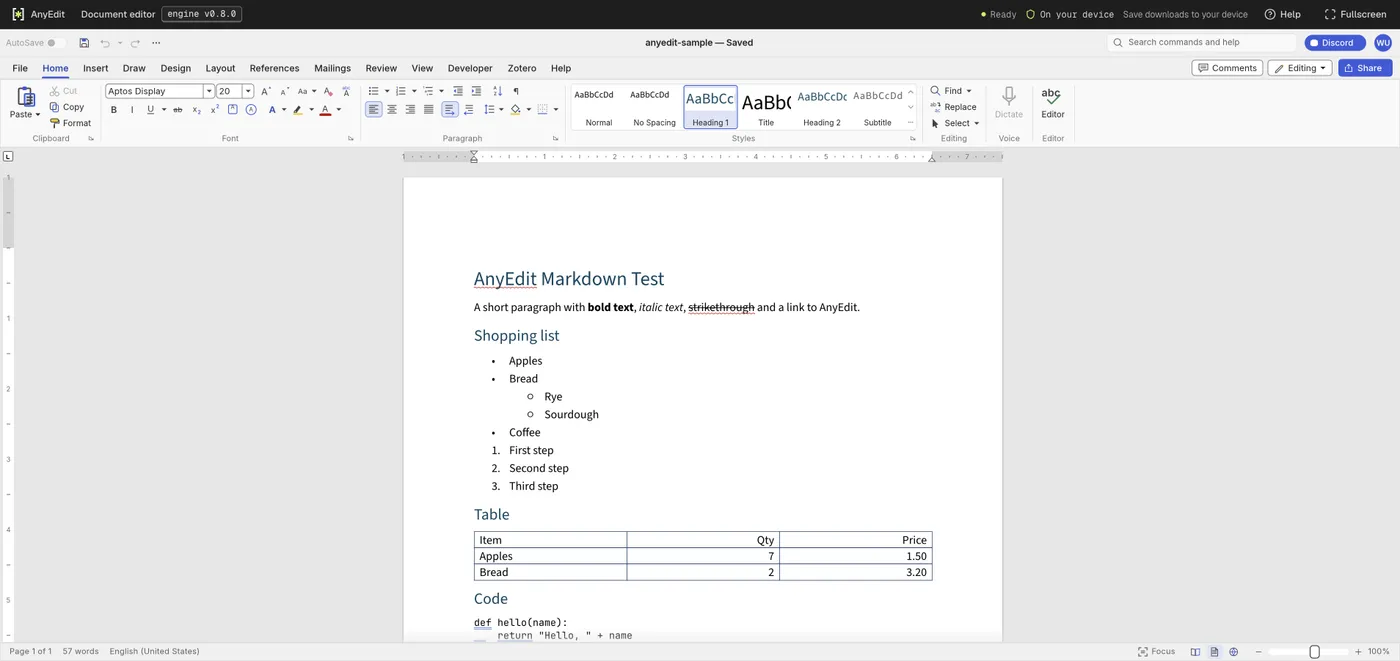
Our test file open in the document editor on anyedit.app, 2026-10-20