Free Online Video Editor
Cut, grade and export video with an open-source alternative to Premiere Pro. It runs in your browser: free, no sign-up, and your footage is not uploaded. A free desktop app is also available.
Prefer an installed app? Download the free desktop app
- Open your browser developer tools and switch to the Network tab
- Open a file in the editor
- Your file never appears as an upload request
Best on a desktop browser. This editor has desktop menus and shortcuts.
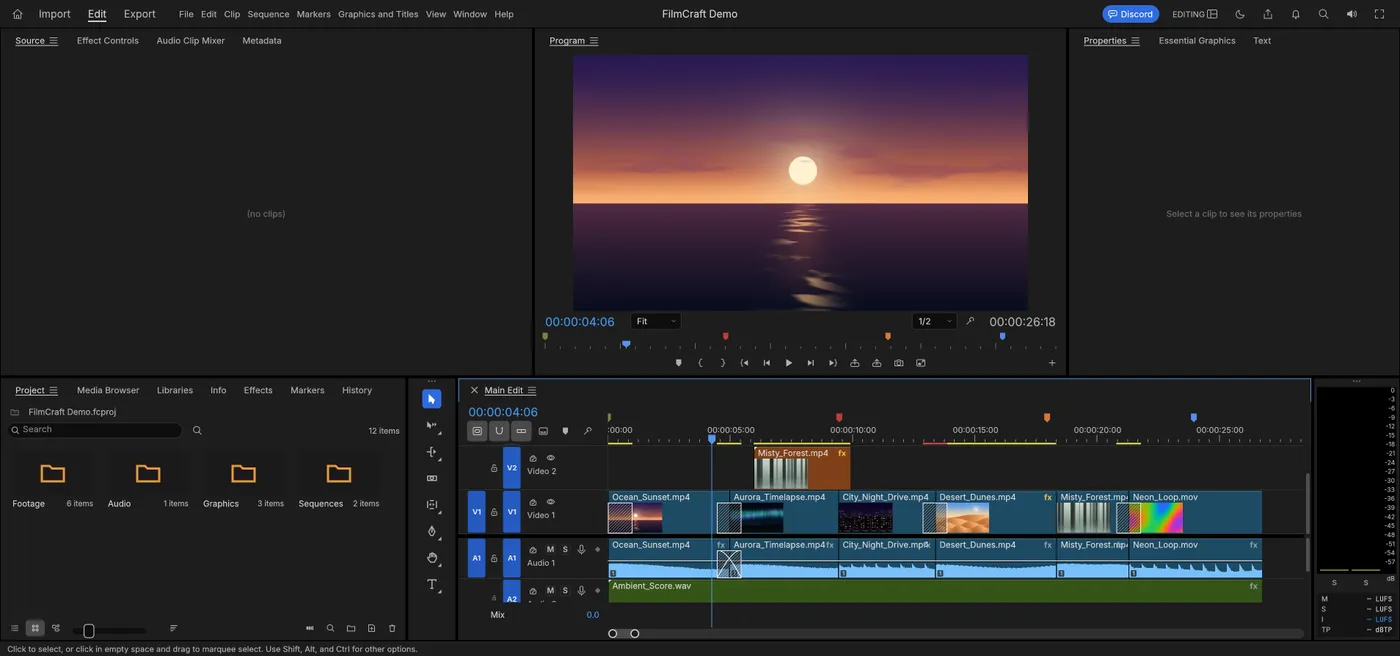
Engine start screen, captured 2026-10-12
Formats it opens
What the engine's own documentation lists. Our own tests are in the compatibility table below.
| Format | Listed by the engine | Tested by us |
|---|---|---|
| .mp4 | MP4 and MOV decode and encode | Not tested yet |
| .mov | MOV is listed with MP4 | Not tested yet |
| .webm | WebM and Matroska decode | Not tested yet |
| .mkv | Matroska decode | Not tested yet |
What you can do
- Edit on a multitrack timeline
- Add transitions, effects and captions
- Import H.264, HEVC, ProRes, VP9 and AV1 video
- Export H.264 MP4 with AAC audio
- Exchange timelines as XML, EDL or OpenTimelineIO
- Import and export SRT, WebVTT and SCC captions
Compatibility
tested 2026-10-12 · engine 0.6.0 · chromium 152 desktop · local server
| Check | Result | Notes |
|---|---|---|
| Editor starts | Works | Loaded with a built-in demo project |
| Play the demo | Works | The preview and timecode advanced |
| Import a video file | Not tested yet | We have not run an open test for this format yet |
| Export a video | Not tested yet | We have not run an open test for this format yet |
| Phone screen (390 px wide) | Not supported | The panels are badly squeezed |
Known issues
- This is a large editor: the first start downloads about 41.5 MB before compression, so it can take a while on a slow connection. Your browser keeps it afterwards.
- When the browser language is Chinese, the editor warns that a Chinese font is missing.
- The tests above ran on a local test server, before this site went live.
When to keep the original software
Keep using the desktop video software for broadcast delivery, camera RAW footage (not supported yet), or projects that depend on its plug-ins.
FAQ
Can I use it in my browser now?
Yes. Press Open editor on this page. The first start downloads about 41.5 MB, then your browser keeps it.
Which video formats does it import?
The editor lists H.264, HEVC, ProRes, VP9 and AV1 in MP4, MOV and WebM. We have not tested imports yet.
Are my videos uploaded?
Not by the editor. It is built to run on your own device.
Does it export H.264?
Yes, H.264 MP4 export is listed. We have not tested it yet.
Runs the open-source FilmCraft engine v0.6.0 (41.5 MiB) · MIT / Apache-2.0 · Last tested 2026-10-12 · source · license