Open .mp4 files online
To open an .mp4 file in your browser, press Open editor on the video editor, then bring your file into the project from inside the editor. MP4 and MOV are the two video formats the editor can both read and write. On 2026-10-15 we opened a 6-second 1280 x 720 test .mp4 (H.264 video with AAC sound) on anyedit.app and it showed in the source monitor with the right picture and a 6-second length. We cut the clip to 3 seconds in a new sequence and exported it with the default H.264 MP4 setting. The exported .mp4 was a valid file with H.264 video and AAC sound, 3 seconds long, and a frame from it matched the source. Two things to know: our test browser cannot fill the system file picker, so we loaded the file by dropping it onto the editor window and have not checked the Import button by hand, and we tested only H.264 with AAC. Nothing is uploaded and there is no sign-up.
Best on a desktop browser. This editor has desktop menus and shortcuts.
Can I open it?
| Check | Result | Notes |
|---|---|---|
| Listed by the engine | Listed in docs | MP4 is listed for both import and export, including fragmented MP4, edit lists and timecode tracks, with H.264 and AAC for output. HEVC is decode only. |
| Opened an .mp4 file | Works | A 6-second 1280 x 720 .mp4 (H.264 and AAC, made with ffmpeg) was added to the project. The Info panel read it as a movie at 30 fps with H.264 (High) video, AAC audio and a 6-second length, and the source monitor showed the test pattern with the timecode running to 6:00. |
| Edited it | Works | We made a new sequence from the clip, cut it at 3 seconds with Ctrl+K and deleted the second half. The sequence became 3:00 long. |
| Exported as H.264 MP4 | Works | Export with the default settings (Format H.264, Multiplexer MP4) downloaded an .mp4 file (2.2 MB). ffprobe read it as MP4 with H.264 1280 x 720 video at 30 fps, 90 frames, and AAC audio at 48 kHz stereo, 3.0 seconds long. Frames at 1 and 2.5 seconds showed the same picture and timecode as the source; the greens look a little duller because the export carries a color tag the source did not have. |
| Import button with a file chooser | Not tested yet | In our automated browser the Import button opened a file picker we could not fill, so we added the file by dropping it into the editor. Not checked by hand. |
| Other codecs, such as HEVC | Not tested yet | Not tested for this format. |
| Exported as MOV or ProRes | Not tested yet | Not tested for this format. |
| Phone screen (390 px wide) | Not tested yet | Not tested for this format. |
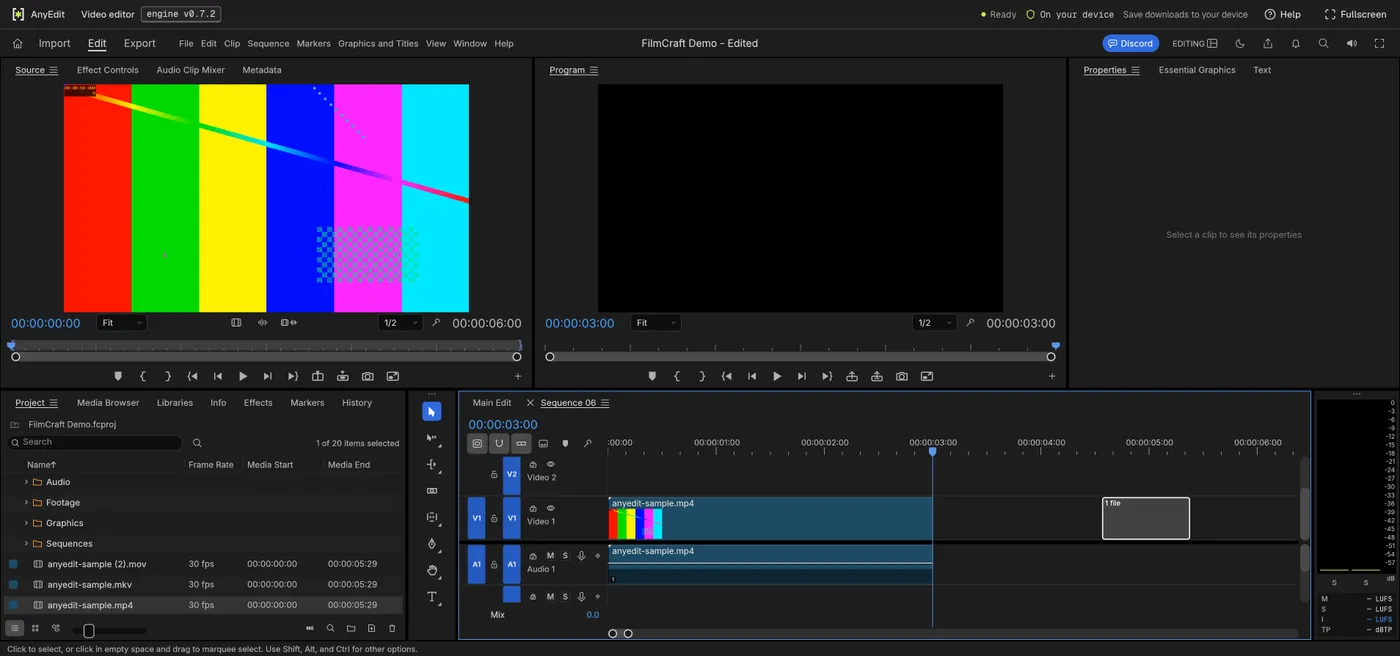
Our test file open in the video editor on anyedit.app, 2026-10-15