Open .srw files online
To open a .srw file in your browser, press Open editor on the RAW photo editor, then choose File > Import Photos and pick your file. The Samsung RAW photo joins the editor's library and opens in the develop view. What you get depends on the file. On 2026-10-29 we opened a public-domain (CC0) 34.5 MB SRW from a Samsung NX200 (from raw.pixls.us): it opened with no notice and showed a pine tree beside a road, upright as the camera saved it, with ISO 200, 16 mm, f/7.1, 1/500 on the info line. We raised Exposure to +1.00 and exported a full-size JPEG, an 8-bit TIFF and a Rendered photo DNG, all 3648 x 5472, and macOS tools read all of them. Its colors differ more from the camera's JPEG than on the other formats we tested (see the test table). A second file, 20.8 MB from a Samsung NX500 with normal compression, opened with a Preview only notice: the editor said it cannot decode that compressed Samsung raw variant yet and that you are editing the camera's embedded JPEG preview. The Raw data DNG option did nothing. Nothing is uploaded and there is no sign-up.
Best on a desktop browser. This editor has desktop menus and shortcuts.
Can I open it?
To export: in File > Export, type any name in the Folder box first (we used exports), or the export button only shows “Choose an export folder first.” and nothing downloads. The browser version has no folder picker, and the file still goes to your downloads.
| Check | Result | Notes |
|---|---|---|
| Listed by the engine | Listed in docs | Samsung SRW is listed as supported for uncompressed files only; the project lists compressed SRW decoding as not done yet. In our test the editor said so itself for a compressed file and fell back to the embedded JPEG preview. The Export dialog lists JPEG, PNG, TIFF, PSD, WebP, AVIF, JPEG XL, DNG and the original file. |
| Opened a .srw file (NX200) | Works | File > Import Photos with a 34.5 MB SRW from a Samsung NX200 (a public-domain sample from raw.pixls.us). It opened within 20 seconds with no Preview only notice, showing a pine tree beside a road in portrait orientation, ISO 200, 16 mm, f/7.1, 1/500 on the info line. The histogram drew and the library marked it SRW. The file size fits an uncompressed 12-bit file, but we did not read the compression setting from the file itself. |
| Opened a compressed .srw (NX500) | Partial | A 20.8 MB SRW from a Samsung NX500 (normal compression, a public-domain sample from raw.pixls.us) opened and showed a mountain town, ISO 100, 50 mm, f/8.0, 1/200, but with a Preview only notice: LightCraft can't decode this raw variant yet (Samsung compressed raw), so you edit the camera's embedded JPEG preview. The notice offers a Reload from Disk button, which we did not try. We did not edit or export this file. |
| Edited it (NX200) | Works | We typed 1 into Exposure in the Light panel. It read +1.00, the picture got brighter and the histogram moved right. |
| Exported as JPEG | Works | File > Export with Full size ticked (quality 90) wrote an 8.5 MB .jpg. The file command and macOS sips read it as a 3648 x 5472 JPEG (portrait) with the camera model, the shot time and the software name LightCraft in its metadata. macOS reports the raw file as 5472 x 3648 because it ignores the rotation flag the camera saved; the export is upright. |
| Exported as TIFF | Works | TIFF with 8-bit depth, ZIP compression and Full size gave a 41.6 MB .tif, which sips reads as 3648 x 5472. Its tags show 8-bit RGB with Deflate compression and a color profile; it differs from our JPEG by about 0.4 on a 0 to 255 scale. |
| Exported as DNG (Rendered photo) | Works | The Rendered photo option downloaded an 87.3 MB .dng. sips reads it as a 3648 x 5472 DNG from the same camera, and the JPEG sips makes from it matches our edited JPEG (average difference about 3 on a 0 to 255 scale). Its TIFF tags show DNG version 1.4, 16-bit RGB with the LinearRaw type and Deflate compression, and the software name LightCraft DNG 2. It is a processed picture in a DNG wrapper, not the sensor data. We did not open it in other RAW software. |
| Exported as DNG (Raw data) | Not supported | The Raw data option, described as raw photos as DNG with the edits embedded, did nothing: after OK no download started, and we waited 60 seconds on one attempt. The same option also failed in our earlier DNG, ARW, RAF, RW2, PEF and NEF tests. |
| Compared with the camera JPEG | Partial | Our JPEG next to the camera's embedded JPEG (rotated upright) and macOS's own rendering of the SRW: the framing and the scene match, nothing shifted. Color and tone differ more than on the other formats we tested. Ours is brighter, as set with +1.00 (average brightness 141 against 110 for the camera JPEG), and has a lighter blue sky. macOS's rendering is much darker and bluer (average brightness 64). Brightness patterns correlate at 0.85 with the camera JPEG and 0.93 with macOS. |
| Other export formats | Not tested yet | The Export dialog also lists PNG, PSD, WebP, AVIF, JPEG XL and Original files. We did not try them. |
| Other SRW variants and cameras | Not tested yet | We tried two files, from the NX200 and the NX500. Other NX bodies (such as the NX1), the NX500 lossless setting, the Reload from Disk button and exporting the NX500 preview are Not tested yet. |
| Phone screen (390 px wide) | Not tested yet | Not tested for this format. |
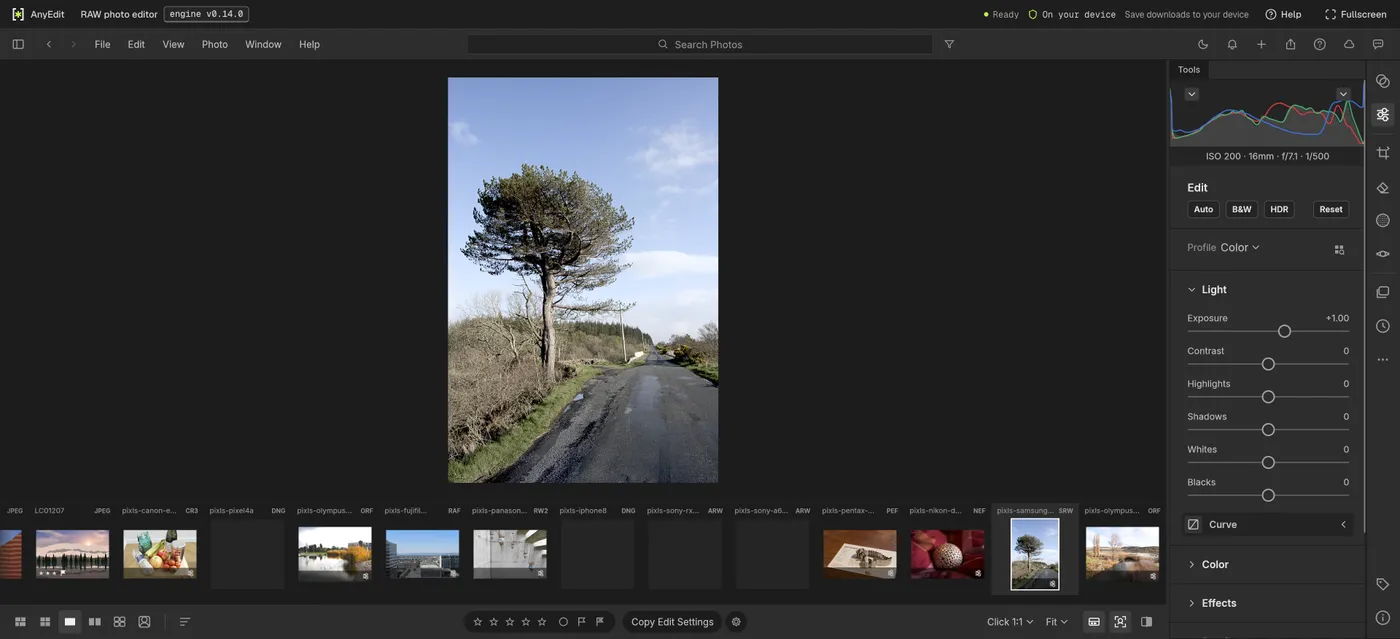
Our test file open in the raw photo editor on anyedit.app, 2026-10-29