Free Online UI Design Editor
Design app screens with frames, auto layout, components and prototypes in an open-source alternative to Figma. It runs in your browser: free and no sign-up. The project is in early alpha, and in our test the browser version could not open or save files yet.
Prefer an installed app? Download the free desktop app
- Open your browser developer tools and switch to the Network tab
- Work in the editor
- Nothing you draw appears as an upload request
Best on a desktop browser. This editor has desktop menus and shortcuts.
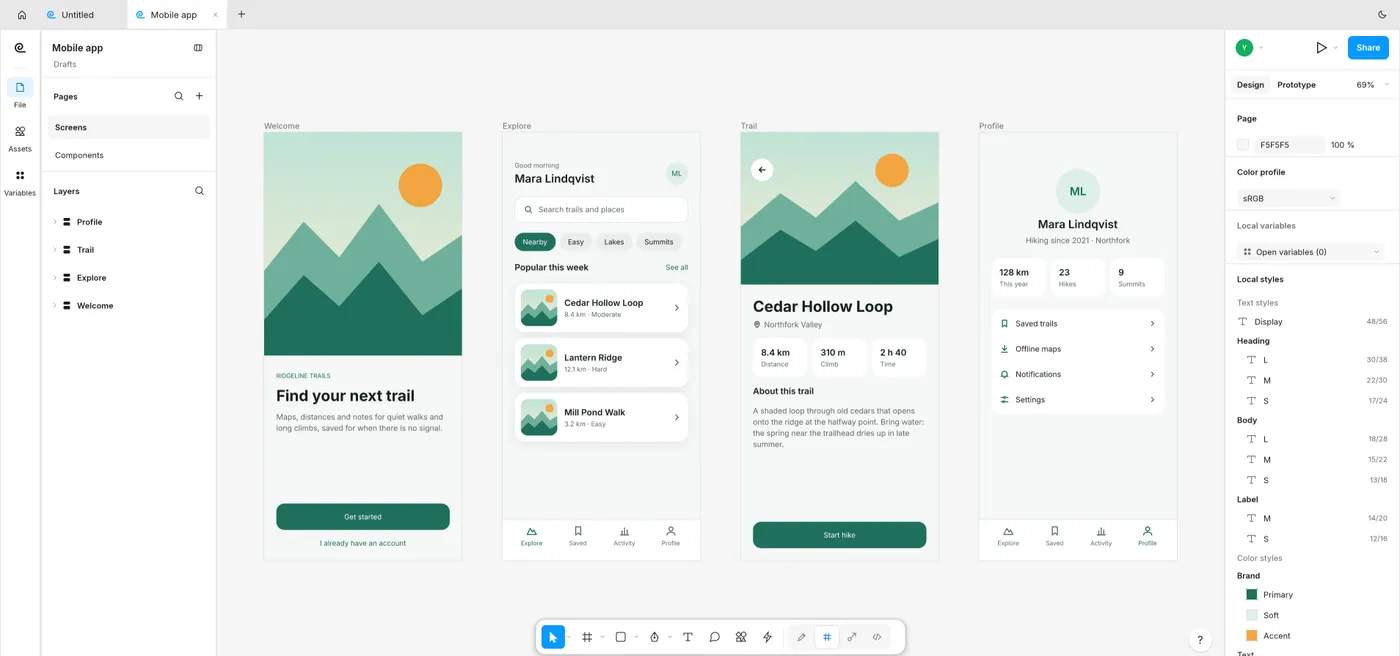
The built-in Mobile app template open in the editor, captured 2026-10-16
Formats it opens
What the engine's own documentation lists. Our own tests are in the compatibility table below.
| Format | Listed by the engine | Tested by us |
|---|---|---|
| .figcraft | Native format: a plain .figcraft archive | Not tested yet |
| .fig | Figma .fig files open on a best-effort basis; the project says it has not checked FigCraft against real Figma documents | Not tested yet |
| .svg | SVG in and out | Not tested yet |
| .png | PNG in and out | Not tested yet |
| .jpg | JPG in and out | Not tested yet |
| .webp | WebP in and out | Not tested yet |
| PDF in and out | Not tested yet |
What you can do
- Lay out screens with frames, auto layout and layout grids
- Build components with variants, properties and instances
- Use styles and variables (color, number, string, boolean) with modes
- Draw with vector networks, boolean groups and the shape builder
- Link frames into prototypes and present them
- Hand off with an Inspect panel and generated code (CSS, HTML, React and more)
Compatibility
| Check | Result | Notes |
|---|---|---|
| Editor starts | Works | Loaded to an empty Untitled document; the Home screen offers templates, Open file and Join with a code |
| New document and a rectangle | Works | Pressing R and dragging drew a 160 x 90 Rectangle; it appeared in the Layers panel and in the Design panel |
| Open the Mobile app template | Works | The built-in template opened with four screens, text styles and color styles |
| Open a file from your device | Not supported | On 2026-10-16 the Open file card, File > Open… and Ctrl/⌘+O did nothing: no file picker appeared. The project's hosting notes say native file dialogs are not wired up in the web build yet. A dropped .svg also did nothing in our scripted drop; a real drag and drop is not tested yet |
| Save or export a file | Not supported | The Export dialog lists PNG, JPG, WebP, SVG, PDF and .fig (experimental). Picking PNG @1x closed it, but no download started. Export page as PNG and Ctrl/⌘+S gave no download either |
| Phone screen (390 px wide) | Not supported | Desktop layout: the canvas is squeezed to a sliver and the right panel is cut off |
Known issues
- This is a mid-size editor: the first start downloads about 21.5 MB before compression. Your browser keeps it afterwards.
- The project calls FigCraft early alpha and estimates it is about 49% of the way to replacing Figma for real work. Expect rough edges.
- In our 2026-10-16 test the browser version opened and saved no file. Use it to try FigCraft; use the desktop app when you need to open or save files.
- .fig files open only on a best-effort basis, and the project has not checked FigCraft against real Figma documents.
- Live sessions are a preview, and the browser version can only join one. Joining connects to a server, so a file in a session leaves your device. We did not test live sessions.
- The editor has desktop menus and shortcuts, so it works best in a desktop browser. On a phone it is not usable.
- The tests above ran on a local copy of this site, before the page went live.
When to keep the original software
Keep using Figma for team work that needs accounts, cloud files and live co-editing, for Figma plug-ins, or when you must open and save files reliably. FigCraft has only a first preview of multiplayer and runs its own plugins instead of Figma's.
FAQ
Can I use it in my browser now?
Can it open Figma .fig files?
Is it a real Figma alternative?
Can I save my design?
Are my designs uploaded?
Runs the open-source FigCraft engine v0.6.0 (21.5 MiB) · MIT / Apache-2.0 · Last tested 2026-10-16 · source · license