Open .ai files online
To open an .ai file without Illustrator, press Open editor on the vector editor, then choose File > Open and pick your file. It works when the .ai was saved with PDF compatibility: on 2026-10-18 we opened two real files saved by Illustrator CC, a 2-artboard logo and a gradient logo with 5 layers, and their layer names, artboard names and shapes all came through. We moved one shape in each, saved with Save As > PDF-compatible .ai, and read the files back with other tools: valid PDFs with the edit and the layer names intact. The catches: only the PDF part of an Illustrator file is read, so art outside the artboards does not open, the saved file is much smaller than the original because Illustrator's private data is not carried over, and we had no Illustrator to check that it opens there. An .ai saved without PDF compatibility is not tested yet. Nothing is uploaded and there is no sign-up.
Best on a desktop browser. This editor has desktop menus and shortcuts.
Can I open it?
| Check | Result | Notes |
|---|---|---|
| Listed by the engine | Listed in docs | PDF-compatible .ai files can be opened and saved. The project says it cannot yet reliably exchange Illustrator's own .ai files, so an .ai without PDF data is the weak spot. |
| Opened an .ai saved by Illustrator | Works | File > Open with two real Illustrator CC (Windows) files from public GitHub repositories (Apache-2.0 and MIT). A 2-artboard, 2-layer logo opened after an Import PDF dialog (crop and page range), and it kept the artboard names (01 - logo with text, 02 - logo without text) and the layer names. A 1-artboard, 5-layer, gradient logo (a CMYK file) opened with all five layer names and the gradients drawn. After opening, a note in the status bar said that only the PDF-compatible part of the file was read, and that art outside the artboards is kept only in the editor's private data, so it does not open. |
| Colors, text and fonts | Partial | The CMYK logo's blues looked a little darker than in a second viewer (Poppler). Text in the logo showed with a pink highlight because its font (Segoe UI) is not available here; the PDF export wrote it in a fallback font, Source Sans 3. |
| Opened a PDF-compatible .ai we made | Works | A hand-written 1 KB PDF renamed .ai, with two layers, Background and Shapes. Both layers appeared by name. A shape that sat inside a form object opened as a plain path, not as a group. This is not an Illustrator file, only the smallest PDF-compatible one. |
| Edited it | Works | In each of the three files we selected one shape and changed it in the Properties panel: narrowed a triangle from 240 pt to 160 pt, moved a small square up, moved a circle down. The shapes changed on the canvas and the tab showed the file as changed. |
| Saved as PDF-compatible .ai | Works | File > Save As > Format PDF-compatible .ai > Version PDF-compatible > OK downloaded a file for each of the three. The file command reads them as PDF 1.7 with 1, 2 and 1 pages. Ghostscript and Poppler drew them with our edits, and macOS sips drew the 2-artboard file once we renamed it to .pdf (sips refuses the .ai name). Layer names survived as PDF layers. The saved files were far smaller than the originals (400 KB to 20 KB, 1.6 MB to 18 KB). We did not open them in Illustrator. |
| Saved as Legacy (version 7) .ai | Partial | In the same dialog, Version > Legacy (version 7) wrote a PostScript-based file, not a PDF. We read it as text: it is an Illustrator 5-style file with the same layer names (2, 2 and 5 layers). A legacy file holds one artboard, so a 2-artboard document needs one file per artboard, and we saved only the first. Ghostscript drew the shapes and our edit, but it drew no text and drew the gradients as flat white, so we could not check those. Not checked in Illustrator. |
| Does a legacy .ai keep groups and layers? | Partial | In the file, yes. We grouped shapes in the hand-made file and saved a legacy .ai: it has two named layers and the group markers around the grouped shapes. Reopening that file in the editor showed two layers and a group. This only shows the editor reads back its own file; we did not check clipping groups, compound paths or images, or that Illustrator opens it. |
| An .ai saved without PDF compatibility, or an old EPS-based .ai | Not tested yet | Not tested yet. We had no sample file, and the project says reliable exchange of Illustrator's own .ai files is not there yet. |
| Phone screen (390 px wide) | Not tested yet | Not tested for this format. |
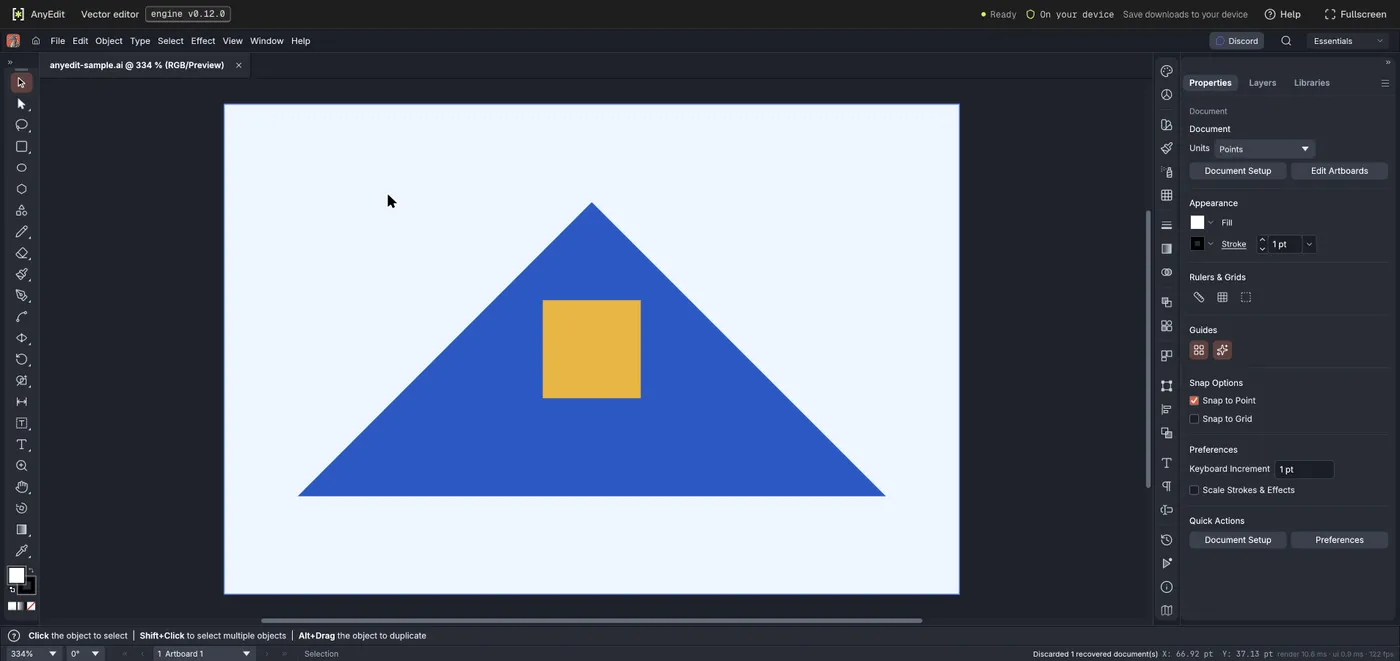
Our test file open in the vector editor on anyedit.app, 2026-10-18