Open .exr files online
To open an .exr file in your browser, press Open editor on the photo editor, then choose File > Open and pick your file. On 2026-10-26 we opened three OpenEXR sample files on anyedit.app: a half-float RGB image with values up to 1025, a half-float RGBA image and a single-channel 32-bit float image. The RGBA file opened but the canvas showed only a checkerboard because its alpha is 0 everywhere, and for the single-channel 32-bit file we did not check how it displays. For the half-float RGB file the editor stores samples as 32-bit float and tells you so in the status bar. We painted a brush stroke on the RGB file and exported it as TIFF: a 32-bit float file that kept the bright values (maximum 1025) and left every pixel outside the stroke identical to the original. Exporting PNG works too, but the editor warns that it reduces 32-bit float to 16-bit and clips HDR values outside 0 to 1. EXR is read-only: you cannot save a new .exr. Export As offers PNG, JPG, WebP, TIFF, TGA and ICO, and Save As wrote a 32-bit .psd. We did not test multi-part, tiled or deep EXR files. Nothing is uploaded and there is no sign-up.
Best on a desktop browser. This editor has desktop menus and shortcuts.
Can I open it?
| Check | Result | Notes |
|---|---|---|
| Listed by the engine | Listed in docs | OpenEXR is listed among the flat image formats the photo editor reads; the notes say OpenEXR keeps half/float samples; they do not say whether EXR can be written. |
| Opened a half-float RGB .exr | Works | BrightRings.exr from the OpenEXR sample images (800 x 800, three half-float channels, ZIP compression, values from 0.5 to 1025) opened as one Background layer, RGB/32. The status bar said "16-bit float samples are stored as 32-bit float". The four ring patterns and the white square were in the right places. |
| Opened a half-float RGBA .exr | Partial | Carrots.exr (600 x 400, half-float RGBA) opened as Layer 0, RGB/32, but the canvas showed only the checkerboard. We read the file with the Python OpenEXR library: its alpha channel is 0 in every pixel while the color channels hold the picture (up to 0.97). So the editor honored the alpha, and a viewer that ignores alpha would show the picture. Check the alpha channel of your own file. |
| Opened a single-channel 32-bit float .exr | Works | WideFloatRange.exr (500 x 500, one G channel of 32-bit float, PXR24 compression, values from about -1.7e38 to 1.7e38) opened as Background, Gray/32, with no float-conversion notice. We did not compare the picture with a reference. |
| Edited it | Works | On the 32-bit RGB document we painted a black brush stroke in the gray area. The stroke showed on the canvas and the document was marked as edited. |
| Exported as TIFF (32-bit float) | Works | File > Export > Export As > TIFF downloaded BrightRings.tif (7.7 MB). The Python tifffile library reads it as 800 x 800 x 3 float32 with a maximum of 1025.0. Comparing with the original EXR, every changed pixel lies inside the stroke area and all other pixels are identical, so the HDR values were not clipped. |
| Exported as PNG | Partial | Export As > PNG downloaded BrightRings.png (32.5 KB), a 16-bit RGB PNG. The editor listed two warnings: "32-bit float will be reduced to 16-bit" and "HDR values outside 0..1 will be clipped". The 0.5 gray of the file was written as 128 of 255, darker than the lighter gray the canvas shows, so the PNG does not look like the canvas. |
| Saved as .exr | Not supported | Not possible. The Export As format list is PNG, JPG, WebP, TIFF, TGA and ICO, with no EXR. File > Save As did not ask for a format: it wrote BrightRings.psd (8 MB, which the file command reads as RGB with 32-bit channels). |
| Multi-part, tiled, deep or lossy-compressed (PIZ, DWAA, B44) EXR | Not tested yet | Not tested. The File menu has an Open EXR Parts item, which was grayed out in our session and which we did not try. |
| Phone screen (390 px wide) | Not tested yet | Not tested for this format. |
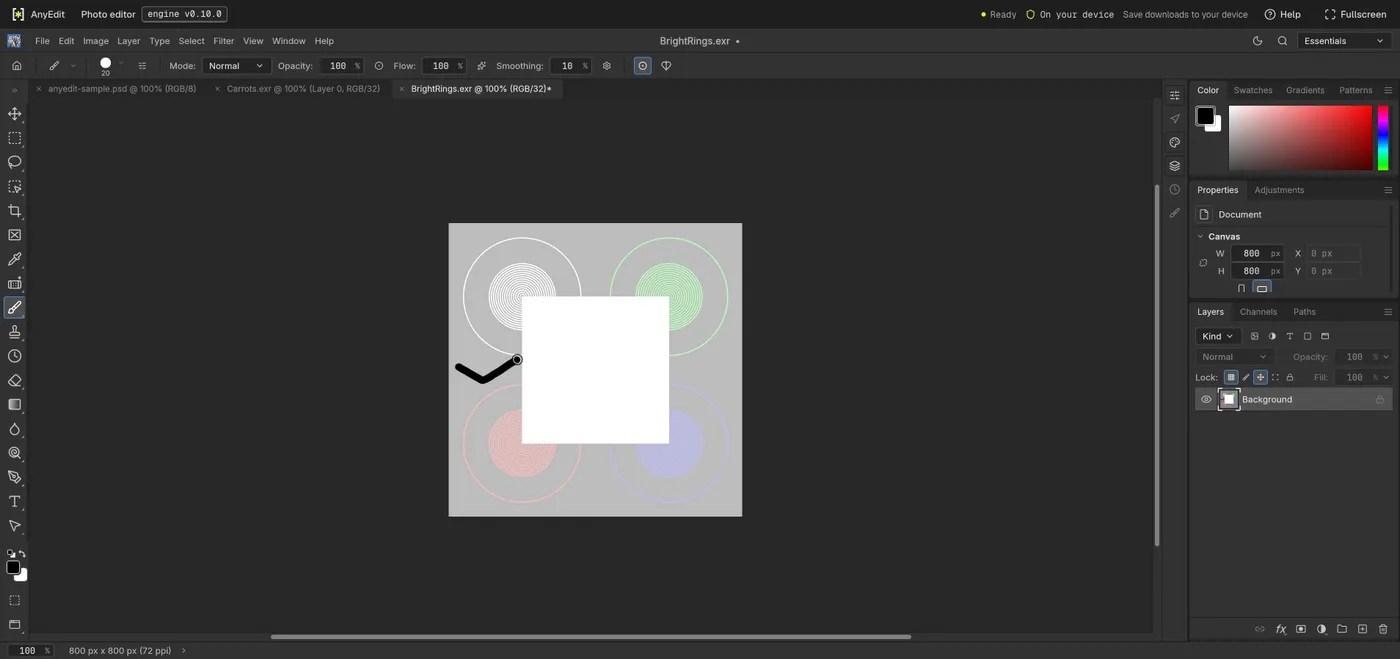
Our test file open in the photo editor on anyedit.app, 2026-10-26