Open .tex files online
To open a .tex file in your browser, press Open editor on the document editor and open your file there (in our automated test we loaded the files by dropping them onto the editor; the Browse button's file picker was not checked by hand). Be clear about what this is: the document editor is a word processor that imports LaTeX, not a LaTeX compiler. It reads the .tex as a document and shows headings, bold, italic, lists, tables and math equations as formatted text; it does not run pdflatex, so macros and packages are not executed. On 2026-10-24 we opened a small article with a title, sections, bold and italic text, a link, bulleted and numbered lists, a table and inline and display equations, and most of it showed, with a few small differences (below). We typed into a heading and exported with Export > LaTeX (*.tex). The exported file is a plain article that uses amsmath and hyperref and opens in the editor again, but it is rewritten, not preserved: sections lose their numbering (\section*), fractions become 1/3, the author line and date are dropped and table columns lose their alignment. Your own macros (\newcommand) disappeared silently, and TikZ, \ref, \footnote and \cite were flattened to text. We did not compile the exported .tex because no LaTeX was installed on the test machine. For a faithful PDF of a real LaTeX project, compile it with a TeX distribution or an online LaTeX compiler; use this editor to read and lightly edit a simple .tex file. Nothing is uploaded and there is no sign-up.
Best on a desktop browser. This editor has desktop menus and shortcuts.
Can I open it?
| Check | Result | Notes |
|---|---|---|
| Listed by the engine | Listed in docs | TeX (LaTeX) is imported and exported by the document editor, alongside DOCX (read and write), ODT, RTF, HTML, Markdown and TXT. The editor is still in alpha. |
| Opened a .tex file | Works | A 974-byte article (\documentclass{article} with amsmath and hyperref) with \title, \author, \date, \maketitle, sections and subsections, \textbf, \textit, \emph, an \href link, itemize, enumerate, a tabular and inline, display and numbered equations opened as a 2-page, 69-word document. The title took the Title style with the author centred under it, sections took heading styles, bold and italic were right, both lists were right, and the equations were drawn as typeset math. The editor shows a formatted document with no LaTeX source beside it. |
| What looks different on open | Partial | Section headings had no numbers (we wrote \section, not \section*). The \date line was not shown. The link text had no blue or underline in the editor. The table had borders on every row, but the right-aligned Qty and Price columns (r in the column spec) were left-aligned. The equation number from \begin{equation} was not shown. In the editor, the integral and sum signs have a small empty box after them; the box is not in the exported PDF. |
| Edited it | Works | We clicked at the end of the Introduction heading and typed " edited". The text changed, the title bar changed from Saved to Edited and the word count went from 69 to 70. |
| Exported as .tex | Works | Export > LaTeX (*.tex) downloaded anyedit-sample.tex (1,144 bytes, ASCII; file reads it as a LaTeX 2e document). It starts with a comment line naming the editor, then \documentclass{article}, fontenc, amsmath, amssymb and hyperref, and holds \textbf, \textit, the \href link, itemize, enumerate, a tabular and the equations. The edited heading was in it. We did not compile it: no LaTeX distribution was installed on the test machine. |
| What changes in the exported .tex | Partial | \section and \subsection become starred (\section*), so numbering is lost. \emph becomes \textit. \frac{1}{3} becomes 1/3, \frac{1}{n^2} becomes 1/(n^2), and the thin space \, is dropped. The equation environment becomes \[ ... \] and its number is lost. \author is emptied and \date is emptied; the author name moves into a centred paragraph. Table columns l|r|r become three p{103pt} columns, so the right alignment is lost. The preamble is replaced by the editor's own, so packages you used are not kept. |
| Opened the exported .tex again | Works | We dropped the exported file onto the editor. It opened with the edited heading, bold, italic, lists, table and both equations, and 70 words. |
| Exported as PDF | Works | Export > PDF document (*.pdf) gave a 2-page, 36 KB Letter PDF with selectable text, which poppler's pdftotext read with all headings, the lists, the table and the equations. The link is a real clickable link to https://anyedit.app/. This is the editor's own layout (sans-serif font, coloured headings), not LaTeX typesetting. |
| Your own macros | Not supported | A file with \newcommand{\brand}{AnyEdit} and the text "The product is \brand{} and caf\'e na\"ive" opened with the macro call silently missing: the line read "The product is and café naïve". Accents written as \'e and \"i were converted correctly, and a verbatim block showed in a monospace font. The macro definition and use are not executed or kept. |
| Packages and cross-references | Partial | A file using tikz, graphicx, \ref, \label, \footnote, \cite and thebibliography opened, but: the \draw command of the tikzpicture was left as stray text "(0,0) circle (1cm);" with no drawing; \includegraphics showed as the text "[Picture: missing-figure.png]" (the image file was missing); \ref showed the label name ("tab:one"), not a number; the footnote text was put inline in parentheses; \cite showed as [knuth84]; and thebibliography became a References heading with the entry. |
| Compile a .tex to PDF with LaTeX | Not supported | Not what this editor does. The PDF export comes from the editor's own layout, not from a LaTeX run. |
| Phone screen (390 px wide) | Not tested yet | Not tested for this format. |
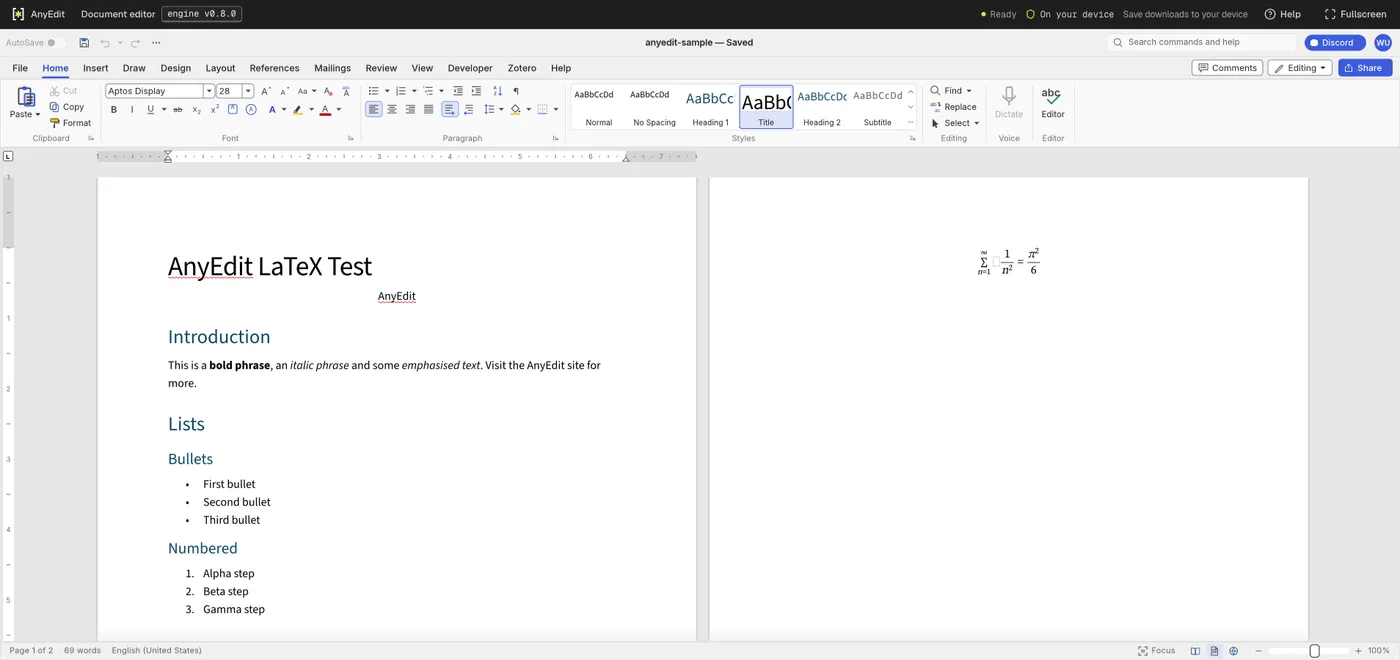
Our test file open in the document editor on anyedit.app, 2026-10-24