Open .gif files online
To open a .gif in your browser, press Open editor on the video editor and bring your file in with Import. The GIF becomes a clip with a preview, a frame rate and a length, and you can cut it on the timeline. This is a video editor, not a simple GIF viewer, so expect a timeline rather than a single picture. On 2026-10-22 we opened a 173-frame, 364 x 235 animated GIF (the rotating Dymaxion map from Wikimedia Commons, public domain). The editor showed it as a 10 fps clip. We cut it to 5 seconds and saved a new animated GIF: it came out as 364 x 235, 50 frames at 10 fps, exactly 5.000 seconds, and it loops. It is not in the normal Format list, though. Export offers H.264, ProRes and similar formats, and the Animated GIF choice appears only after you pick the Animated GIF preset under More presets. Things to know: the preset defaults to 640 x 360 at 15 fps (we switched both to Match Source), the transparent background of our file came out black, and a GIF whose frames use the tiny 1/100 second delay is played at 1/10 second per frame, so that file runs 17.3 seconds, not the 1.82 seconds that ffprobe reads from the raw delays. We loaded our test files by dropping them onto the editor; the Import file picker was not checked by hand. Nothing is uploaded and there is no sign-up.
Best on a desktop browser. This editor has desktop menus and shortcuts.
Can I open it?
| Check | Result | Notes |
|---|---|---|
| Listed by the engine | Listed in docs | GIF is listed as an image you can import, and animated GIF as an export format. The vector and photo editors also list GIF. |
| Opened an animated .gif | Works | A 173-frame, 364 x 235 animated GIF of 3.25 MB (a rotating Dymaxion map from Wikimedia Commons, public domain) was added to the project. We made a sequence from the clip and the program monitor showed the map, folding from a globe into a flat shape as we moved the playhead. The Info panel read Movie, 10 fps, 364 x 235, codec GIF, duration 17 seconds 3 frames. We did not watch it play in real time. |
| Opened other GIFs | Works | A 20-frame test GIF (320 x 180, 2 seconds) was added as a 2-second clip. A single-frame GIF was added as a still picture with a default length of 5 seconds. |
| Playback speed | Partial | The file stores 172 frames with a 1/100 second delay and one with 1/10 second. ffprobe adds that up to 1.82 seconds. The editor treats the 1/100 second delays as 1/10 second, so the clip is 10 fps and 17.3 seconds long. Chrome and Firefox are known to treat very short delays the same way, but we did not compare against another viewer. |
| Edited it | Works | We set the playhead to 5 seconds, cut with Ctrl+K, selected the right part and deleted it. The sequence became 5 seconds long. |
| Exported as an animated .gif | Works | There is no GIF in the Format list (H.264, H.265 and AV1 are greyed out, then ProRes, DNxHR, APV and QuickTime). Opening More presets and searching for gif gives Animated GIF 640x360, and then the Format shows Animated GIF. We ticked Match Source for frame size and frame rate, and the browser downloaded Sequence 01.gif, 948,595 bytes. |
| Checked the exported .gif | Works | macOS file reports GIF image data, version 89a, 364 x 235. ffprobe reads 50 frames at 10 fps, exactly 5.000 seconds. A read of the file shows 50 frame delays of 0.1 second and a loop block, so it repeats. Frames 25 and 49 show the same pose as frames 25 and 49 of the source. We opened the exported file in the editor again and it showed as a 5-second clip with the same picture. |
| What the export changes | Partial | The transparent background of our file turned black, which is how the editor draws it too. The GIF preset defaults to 640 x 360 at 15 fps, which enlarges and re-times the clip unless you tick Match Source. The export panel has no palette, dither or loop options. The export is 0.95 MB against 3.25 MB for the source, mostly because it is shorter. |
| GIF in the vector and photo editors | Not tested yet | Not tested yet. Both editors list GIF, but we did not open a GIF in either of them. |
| Large or long GIFs, partial-frame GIFs, speed changes | Not tested yet | Not tested yet. We tried only one 3 MB file of 173 frames, and we did not test a speed change, a frame-rate change or text on top of the GIF. |
| Phone screen (390 px wide) | Not tested yet | Not tested for this format. |
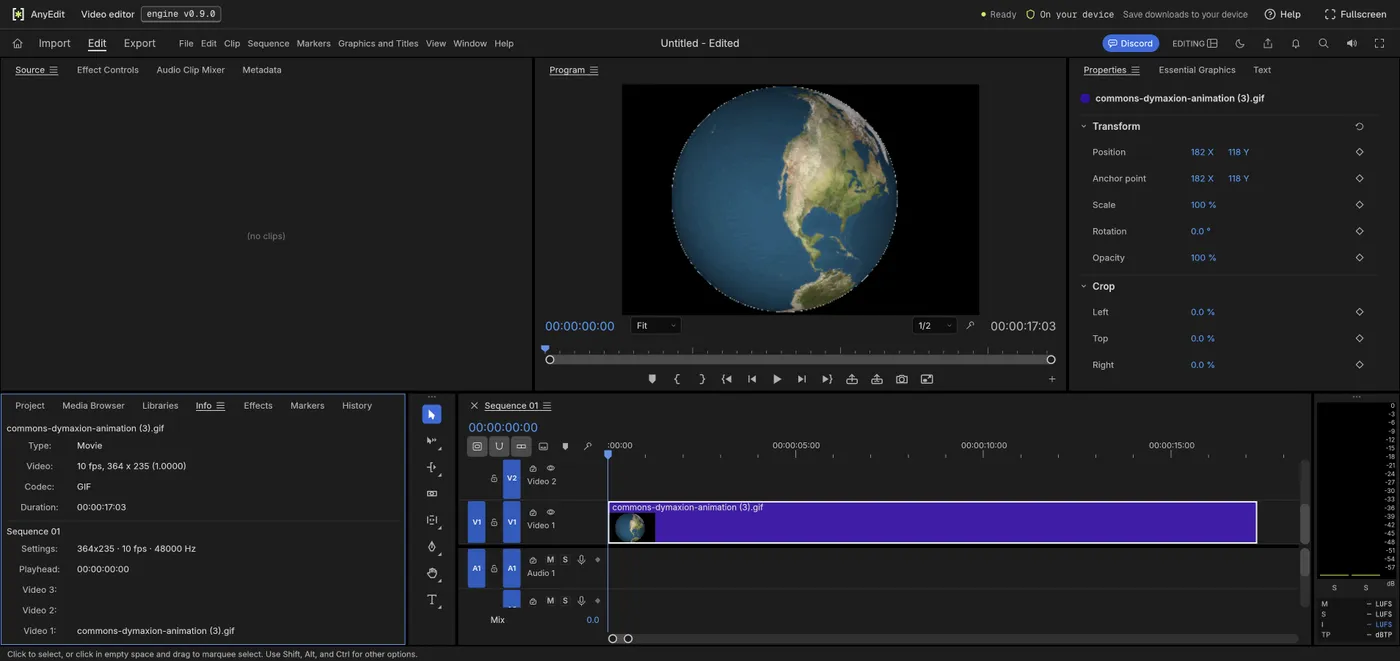
Our test file open in the video editor on anyedit.app, 2026-10-22