Open .vtt files online
A .vtt file is plain text, so any text editor opens it. This page is for when you want the cues in a list with their times, to edit them and write a .vtt back. WebVTT is a caption feature of the video editor, not a separate tool. On 2026-11-03 we dropped a hand-made .vtt onto FilmCraft 0.14.0 on anyedit.app. The file had a NOTE block, a cue identifier, cue settings (align, position, line), inline tags (bold, italic, a yellow class) and a cue at 1:04. It imported as caption track C1 with three cues, and selecting a cue showed its text with its In and Out in the Properties panel. We added a few words to one cue; the edit only stuck after pressing Tab or clicking elsewhere. On the Export page, Captions > Export Options > Create Sidecar File offers SubRip (.srt) and WebVTT (.vtt) only, with no SCC. The exported .vtt kept the NOTE, the cue identifier, the cue settings and the inline tags, and held our edit; ffmpeg parsed it. Cue times were snapped to video frames at 23.976 fps, for example 2.000 became 2.002 and 2.200 became 2.211. Caveats: the sidecar download also saves a video (set a short Range to save time), and the 1:04 cue was outside our 10 second export range, so it was not checked. Styled-cue rendering, burned-in captions, real-world .vtt files and the phone layout are untested. For .srt files see the SRT page. Nothing is uploaded and there is no sign-up.
Best on a desktop browser. This editor has desktop menus and shortcuts.
Can I open it?
| Check | Result | Notes |
|---|---|---|
| Listed by the engine | Listed in docs | Caption tracks with SRT, WebVTT and SCC import and export, frame-exact timing, and editing in the Text panel. |
| Opened a .vtt file | Works | anyedit-rich.vtt, a 360-byte file we wrote by hand (a NOTE block, the cue identifier intro, align, position and line cue settings, bold, italic and yellow-class tags, and one cue at 1:04), was dropped onto the editor. Caption track C1 "anyedit-rich · Subtitle" appeared with three cues, and the program length grew to 1:05:18. Selecting a cue showed its text and In and Out in the Properties panel, in timecode at 23.976 fps. |
| Edited a cue | Works | We added " EDITED" to the text of the second cue. The edit must be committed with Tab or a click elsewhere: the first time we went straight to the Export page and the change was lost. After committing, the text stayed when we selected the cue again. |
| Exported .vtt as a sidecar | Works | On the Export page, Captions > Export Options > Create Sidecar File lists SubRip (.srt) and WebVTT (.vtt) as the only formats; there is no SCC. With Range set to Custom 0 to 10 s, Export downloaded Main Edit.vtt (270 bytes) and then Main Edit.mp4. A sidecar cannot be exported without the video. |
| Contents of the exported .vtt | Works | The NOTE block, the cue identifier, the cue settings and the inline tags were all kept, and EDITED was in the text. ffmpeg parsed the file (ffmpeg -i x.vtt -f srt) and ffprobe identified it as webvtt. |
| Cue times | Partial | Times were snapped to video frames at 23.976 fps: 0.500 became 0.501, 2.000 became 2.002, 2.200 became 2.211 and 4.000 became 4.004. |
| Exported .srt directly | Works | File > Export > Captions... also downloaded Main_Edit.srt without a video. |
| The cue at 1:04 | Not tested yet | It lies beyond the 10 second export range we used, so we did not check it in the exported file. |
| Styled cue rendering, burned-in captions, real-world .vtt files | Not tested yet | Not tested for this format. We only used our own sample file. |
| Phone screen (390 px wide) | Not tested yet | Not tested for this format. |
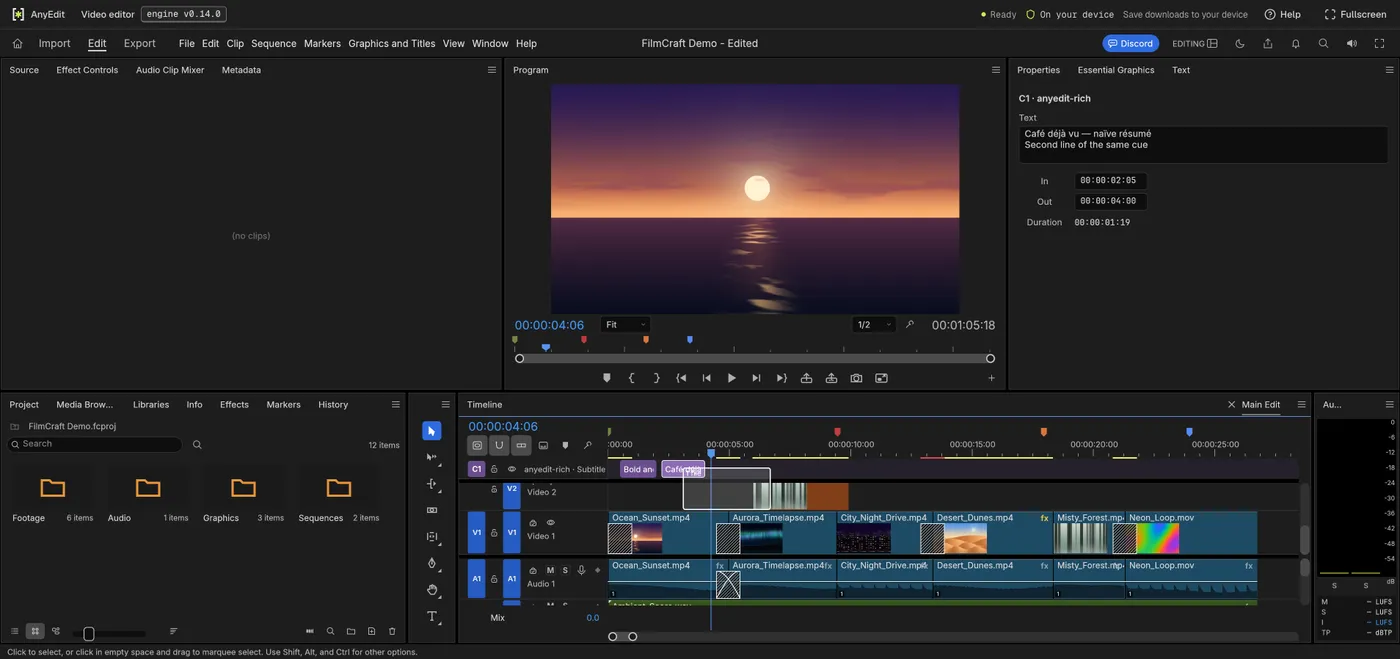
Our test file open in the video editor on anyedit.app, 2026-11-03